Activity
Mon
Wed
Fri
Sun
May
Jun
Jul
Aug
Sep
Oct
Nov
Dec
Jan
Feb
Mar
Apr
What is this?
Less
More
Memberships
Skoolflow
86 members • Free
Skool Automation
22 members • $29/month
Learn Spanish - Layers Method
954 members • $29/month
260 contributions to Learn Spanish - Layers Method

9h •
New member
Hello everyone, My name is Darryn and here for the same reason as all to learn Spanish. I live in Valencia, Spain and want to improve my level of basic Spanish, so looking forward to learning this method to help me retain and learn a different way. Cheers

1 like • 4h
Welcome Darryn! Great to have you here 😊 Living in Valencia is the perfect place to learn, you’ll pick it up faster than you think!

2d •
Hello everyone
I just signed up yesterday, really looking forward to the challenge of learning a new language. I am wanting to travel central and south America at the end of the year. So this will really help make connections.
1 like • 5h
👋👋Welcome, @Charlotte Rees Where in South America are you planning to visit?

2d •
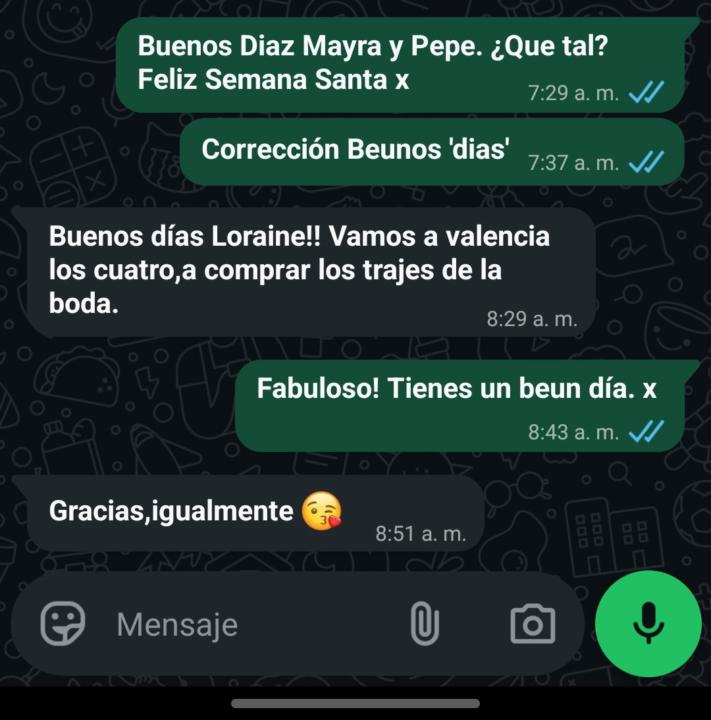
Small step felt like a Big stride!
Layers gave me the motivation to set a goal! So pleased I didn't use Google and so pleased I was understood and so excited to see response included 'igualmente'.
1 like • 5h
YEAH!!! 💪💪 Well done🫡

3d •
Special characters ñÑ¡¿ for non-Spanish keyboard layouts in windows
Since I'm from Germany, and my keyboard-layout is in German, I was looking for a way to easily type the special Spanish characters. I did some research, and though there are multiple ways, I found this one the easiest. Maybe this is old new for most of you, you have implemented it different, or you're not on windows. In that case, just disregard my post. I just thought it can't hurt to share it here. This way, I just have to press the right ALT key plus "n" to get "ñ", just like you would press right ALT plus "q" to get the @ character. This is a little step by step guide for the setup, with help from Gemini ;) Quick Guide: How to Install and Use AutoHotkey 1. Installation Go to autohotkey.com and click Download. Choose Download v2.0 (the current standard). Warning, some malware scanner might trigger a false positive, since this is a scripting tool. Run the installer and follow the prompts to complete the setup. 2. Create Your Script Right-click anywhere on your desktop or in a folder. Select New > AutoHotkey Script. Give it a name (e.g., Spanish_Chars.ahk). Right-click the new file and select Edit Script (it will open in Notepad). 3. Add the Code Delete any existing text in the file and paste your shortcuts. For example: ; --- Spanish Special Characters (AltGr Combinations) --- ; Spanish n (ñ / Ñ) <^>!n::Send "ñ" ; AltGr + n <^>!+n::Send "Ñ" ; AltGr + Shift + n ; Inverted Exclamation Mark (¡) <^>!1::Send "¡" ; AltGr + 1 ; Inverted Question Mark (¿) ; Using the "/" or "?" key for international compatibility <^>!/::Send "¿" ; AltGr + / <^>!+?::Send "¿" ; AltGr + Shift + ? (Note: In v2.0, the Send command uses quotes around the characters). 4. Run the Script Save the file and close Notepad. Double-click the script file to run it. You will see a green "H" icon in your System Tray (bottom right corner of your taskbar). This means the script is active. 5. Managing the Script To Stop: Right-click the green "H" icon and select Exit.
2 likes • 5h
Thanks for sharing this!!

1 like • 5h
Buenas buenas!! Bienvenida 👋
1-10 of 260

@ana-keren-lann-3871
Your Layers Method community manager! Here to help you 💪🏼
Active 2h ago
Joined Dec 9, 2025
ENFP
Mallorca
Powered by