Activity
Mon
Wed
Fri
Sun
May
Jun
Jul
Aug
Sep
Oct
Nov
Dec
Jan
Feb
Mar
Apr
What is this?
Less
More
Memberships
Learn Spanish - Layers Method
951 members • $29/month
4 contributions to Learn Spanish - Layers Method

🔥
Feb 13 •
¿de dónde eres? 🌍 (Challenge Layer 1b)
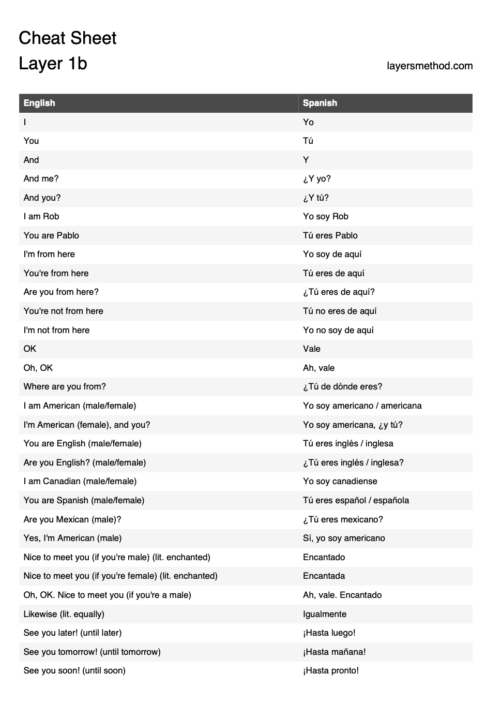
this is the #1 most experienced conversation when traveling... it's also the EASIEST conversation starter: - introducing yourself - saying where you're from - asking them the same! This is PERFECT practice for our Layer 1b basics, working with the top 40 words ✨ (cheat sheet below) 𝙃𝙚𝙧𝙚'𝙨 𝙩𝙝𝙚 𝙘𝙝𝙖𝙡𝙡𝙚𝙣𝙜𝙚: 1. Share a photo of your hometown/country 2. Introduce yourself AND where you're from Don't worry about perfect grammar, we're all learning together! Use these Layer 1b phrases: - "Yo soy..." (I am...) - "Yo soy de..." (I am from...) I'll go first: "¡Yo soy Valeria y soy de Puerto Rico" 🇵🇷 Poll Question: Where do you want to visit next to practice Spanish? Can't wait to see all your beautiful hometowns and travel plans! hope ya'll have an AMAZING day 💕 p.s. we got soooo many peeps visiting spain soon! Glad to see @Churnet Pieters is back and prepping for October adventure 😌 p.s.s if you want to visit Mallorca with us in May, check this out!
Poll
51 members have voted

0 likes • 3d
¡Hola! Me llamo Thomas. Soy de y vivo en Alemania. Perdon por no foto. De dónde eres? (Corrections are welcome 😉)
3d •
Special characters ñÑ¡¿ for non-Spanish keyboard layouts in windows
Since I'm from Germany, and my keyboard-layout is in German, I was looking for a way to easily type the special Spanish characters. I did some research, and though there are multiple ways, I found this one the easiest. Maybe this is old new for most of you, you have implemented it different, or you're not on windows. In that case, just disregard my post. I just thought it can't hurt to share it here. This way, I just have to press the right ALT key plus "n" to get "ñ", just like you would press right ALT plus "q" to get the @ character. This is a little step by step guide for the setup, with help from Gemini ;) Quick Guide: How to Install and Use AutoHotkey 1. Installation Go to autohotkey.com and click Download. Choose Download v2.0 (the current standard). Warning, some malware scanner might trigger a false positive, since this is a scripting tool. Run the installer and follow the prompts to complete the setup. 2. Create Your Script Right-click anywhere on your desktop or in a folder. Select New > AutoHotkey Script. Give it a name (e.g., Spanish_Chars.ahk). Right-click the new file and select Edit Script (it will open in Notepad). 3. Add the Code Delete any existing text in the file and paste your shortcuts. For example: ; --- Spanish Special Characters (AltGr Combinations) --- ; Spanish n (ñ / Ñ) <^>!n::Send "ñ" ; AltGr + n <^>!+n::Send "Ñ" ; AltGr + Shift + n ; Inverted Exclamation Mark (¡) <^>!1::Send "¡" ; AltGr + 1 ; Inverted Question Mark (¿) ; Using the "/" or "?" key for international compatibility <^>!/::Send "¿" ; AltGr + / <^>!+?::Send "¿" ; AltGr + Shift + ? (Note: In v2.0, the Send command uses quotes around the characters). 4. Run the Script Save the file and close Notepad. Double-click the script file to run it. You will see a green "H" icon in your System Tray (bottom right corner of your taskbar). This means the script is active. 5. Managing the Script To Stop: Right-click the green "H" icon and select Exit.

🚀
Aug '25 •
NEW MEMBERS: START HERE
1. We help you achieve one clear goal: A 10-minute Spanish conversation. You can self-study by following the lessons on your own or... 2. If you want help, in our famous Hands-On Transformation, Francisco (the worlds greatest language teacher) personally guides you to a 10 minute conversation over 7-weeks. REGISTER YOUR INTEREST HERE 3. To learn how to use The Layers Method START HERE Welcome aboard, new friend! Rob

0 likes • 5d
@Keren Lann Hi Keren, sorry to bother you this early on. And I'm not 100% sure if this is the right place. But in fact one early question came up today. In the introduction video, Rob talked about spaced repetition. I know that concept from tools like Anki. It's just not clear to me how it's implemented here. Will I be reminded automatically "hey, some vocabulary from 1a need repetition", do they show up in later decks automatically when it's "time for a repetition", or do I have to keep track of that by myself, by just revisiting older decks from time to time? Thanks so much in advance.
1 like • 4d
@Keren Lann Thx Keren
🚀
Feb 11 •
Challenge Layer 1a
ONLY if you achieve OVER 80% in Flashcard Deck 1a, tell us your score in the post comments. If you know how, take a photo or screenshot and post that too. It doesn't matter how many attempts it takes you 🙌 We want to share the victory with you! 🙌

1 like • 5d
1a: 96% after one "rerun". Feels good ;)
1-4 of 4

Online now
Joined Mar 31, 2026
Powered by