Activity
Mon
Wed
Fri
Sun
May
Jun
Jul
Aug
Sep
Oct
Nov
Dec
Jan
Feb
Mar
Apr
What is this?
Less
More
Owned by Jason
Learn. Share. Create. — Empowering reMarkable, Supernote, and BOOX tablet users worldwide. einkpads.com
Not all schools have walls. A global network for digital nomads sharing homes, vehicles, intel, and income strategies.
Memberships
218 contributions to Ep - reMarkable Tablet Support

4d •
Callander updating issue. Please help
OK I have finally gotten my calendar going but now I can't seem to get calendar settings(epcalsynsc) frequency to check for update, the area that you pick 15 min all the way to 24hours, i can not seem to get that to work. I feel like it has to do with the wifi settings on(epcalsynsc) The known device ip address commonly used its doesn't let me do anything. Help please

0 likes • 23h
port 22 is SSH or FTP port. It is only for outbound.
0 likes • 23h
@Jeffrey Butler RM connects fine inside the reMarkable app because use standard http to communicate like standard websites do. They own their cloud so they communicate directly. Our app communicates directly to your tablet. Which allows us to bypass the reMarkable cloud for updates and do not need a internet connection on the tablet to pass files between the app and your tablet.

4d •
Help please
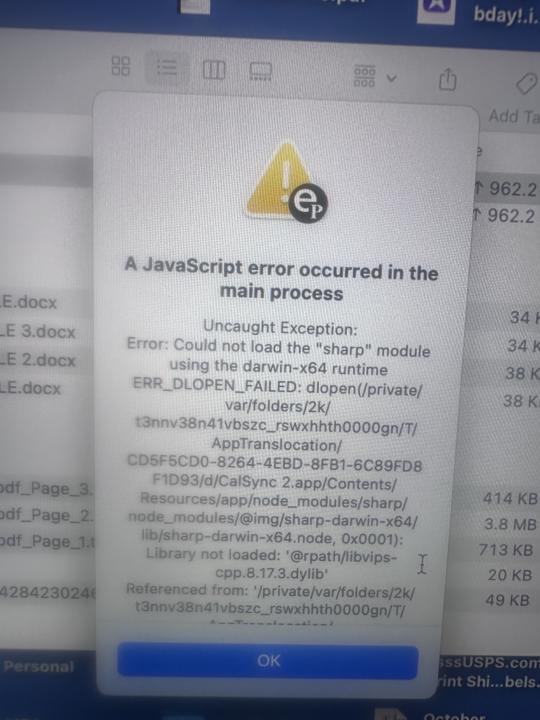
Please help me use my cal sync app. It doesn’t work when I click to open it on my laptop. I followed instructions but keep receiving an error message. I have MacBook
0 likes • 1d
@Cornelia Montague did you run the appropriate app for your system? Download Latest Version 1.0.34 Apple Silicon (M1 / M2 / M3) https://www.einkpads.io/api/calsync/darwin/arm64/releases/latest Intel Mac https://www.einkpads.io/api/calsync/darwin/x64/releases/latest
0 likes • 23h
@Rebecca Hubbard Can you send me a chat message with your email. The one you used at purchase. I will look through your account to see if there are any issues there.
1d •
🐣 Happy Easter, everyone! 🌸
Today’s a reminder of fresh starts, new energy, and the power of growth — both in life and in what we’re building together here. Whether you’re spending the day with family, relaxing, or just taking a moment for yourself… enjoy it. You’ve earned it. And a small reminder we try to live by here — treat people the way you’d want to be treated. It goes a long way, especially in a community like this. We’re grateful for all of you — the conversations, the support, and the journey we’re building together. Big things are coming… and we’re just getting started. Drop a 🐰 below if you’re here and celebrating in your own way. — Jason
0 likes • 1d
thanks @Scott Kirstein !! 🐰

Jan 6 •
CalSync installation don't start!
Hi everybody, I bought both EP CalSync and Ep Binder some times ago and am now trying to install both, with no luck so far...😠 I managed to get Ep Binder installed and it seems to work both with WiFi or through USB. But when I launch the Ep CalSync installation, I immediately get an error message: "Application Error An unexpected error occured: listen EADDRINUSE: address already in use :::4200" I don't even get to the moment where I should provide the IP and Pwd... Can anybody please provide help on this matter? Thanks in advance. Win11 - reMarkable2 Yves
0 likes • Jan 6
yes they use the same port and you dont want two apps connecting to your tablet simultaneiously
0 likes • 1d
@Michael Nealy thanks for helping!
Feb 10 •
🎉 reMarkable Tablet GIVEAWAY ANNOUNCEMENT 🎉
Win a reMarkable Journey Bag + reMarkable Paper Pro We’re running a 60-day community giveaway and keeping it simple, fair, and transparent. No purchase required. No tricks. Just community participation. 🏆 What You Can Win 🎒 reMarkable Journey Bag ✍️ reMarkable Paper Pro 🔥 How the Winner Is Chosen This is NOT a random drawing. The winner will be selected based on: - 📈 Your position on the Skool Leaderboard - 💬 Your community participation - 🤝 Your referrals (when they join) 👉 The higher you rank on the leaderboard, the better your chances. Community involvement matters. ✅ How to Enter (Tracked Here in Skool) 1️⃣ Join this Skool community → 1 entry If you’re reading this, you’ve already completed step one 🙌 2️⃣ Share this group with a friend → 2 entries Know someone with a reMarkable (or who wants one)? Invite them. You receive credit once they join. 3️⃣ Share with multiple people → 3 total entries (max) More shares = better odds. 👉 To make sure we track your entries: Comment below once you’ve shared and tag who you invited. You’ll receive credit once they join. 👉 Your Group participation level must be Level 2 or higher to qualify. 📊 Want to Increase Your Odds? Check the Leaderboard inside the group and see where you rank. The higher your engagement: - Posting - Commenting (Meaningful) - Helping others - Sharing the group The stronger your position becomes. Sharing gives you a 2x boost, but overall involvement is what sets you apart. ⏳ Giveaway Details 📅 Runs for 60 days 🌍 Open worldwide 💳 No purchase necessary 🏁 Winner announced inside this Skool group

1 like • Mar 3
I've updated the rules to give more clarity. Thanks so much for everything everyone!
0 likes • 1d
Everyone if you share this group to others please only share with those who would benefit from it as we only want people in the group who can provide valuable contributions. Thanks so much
1-10 of 218

@jasonbourneblack
CTO of multiple ventures.
Tech founder building tools for digital nomads. Focused on freedom, ownership, and building a life without limits.
Active 17m ago
Joined Sep 11, 2025
Vietnam
Powered by