Activity
Mon
Wed
Fri
Sun
May
Jun
Jul
Aug
Sep
Oct
Nov
Dec
Jan
Feb
Mar
Apr
What is this?
Less
More
Memberships
🌴 Unemployed Abroad 🌴
168 members • Free
Make Human Skills Matter
76 members • Free
The Hard Way Fitness
50 members • Free
NMI Connection Creator Academy
22 members • $5/month
SuperCharge Your Confidence
21 members • Free
Weather Watchers Community
31 members • Free
Doing What You Know
42 members • $12/month
Functional Living Academy
49 members • Free
theBlogMan Academy
18 members • $15/month
1852 contributions to Evolve Now Social
4h •
Mindset Monday
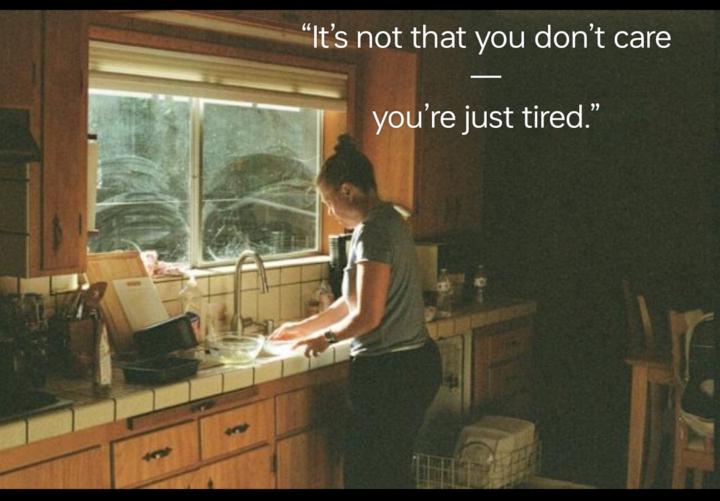
💭 Mindset Monday 😔 “You’re not behind—you’re carrying more.” As a single parent, your brain is carrying 10 tabs at once. So today, don’t try to win the whole day—just win the next hour. That’s enough. That’s progress. A simple daily journal - 👉 Helps clear mental clutter + reset focus. https://www.amazon.com.au/Things-Need-Write-Because-Parent/dp/B0GM7564N4/ref=mp_s_a_1_5?crid=1GYSPBC7Z0IT4&dib=eyJ2IjoiMSJ9.AKzMPtxAqOJ-5zcXmKvlti0IBqZVBCnvhtUKZ8jgGK4v05FMw9kkJorrPzS4d55QRVUGFgUvYYKcDj8W0n5aJMbwu6H3630pUNtDiuawiWIcv0nQG_swv0bPgEDFiiapPdqmlq_HhRtil33KikepBl3Wx7KRDu3V49LfZMLxiNttfM_IGnLxUcDGdRTMGfl1Ha2nkj6zy1bhyF5jBFD94g.Wlx0bQ2Xt-9Rdpp2q3CVq3FMjQtFa8Zmw64EYvoJx38&dib_tag=se&keywords=simple+daily+journal+for+busy+single+parents&qid=1775469742&sprefix=%2Caps%2C297&sr=8-5
1 like • 4h
I didn't know how to shorten the link like in other social media platforms. LinkedIn shortens it as soon as you post it, and on FB - the link is embedded in the product item.
1 like • 4h
Open image to see the complete statement.


1 like • 13h
The parents because they're the ones who produced the child.

🔥
18h •
Imagine
Imagine all the shelters empty for a day. No cages around us Above us, only sky Imagine all the animals, living for today (ah) Imagine there's no hunger It isn't hard to do Nothing to kill or die for And no pain too Imagine all the animals, living life in peace (yoo-hoo) You may say I'm a dreamer But I'm not the only one I hope someday you'll join us And the world will be as one Imagine no sadness I wonder if you can No need for greed or hunger A brotherhood of animals Imagine all the animals, sharing all the world (yoo-hoo) You may say I'm a dreamer But I'm not the only one I hope someday you'll join us And the world will live as one Promotion Hub

1 like • 13h
That's a song isn't it?
1 like • 13h
I believe with all my heart that all animals will live free.

5 likes • 1d
Great addition.
0 likes • 13h
I'm looking forward to seeing what our future looks like.
14h •
Too Many Notifications
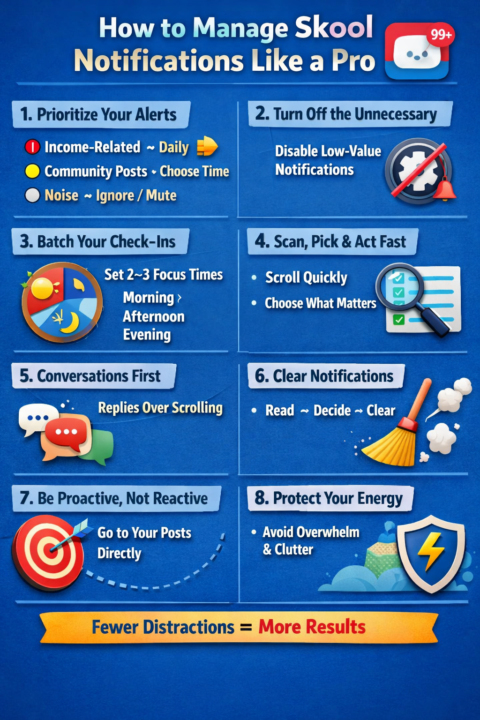
If your Skool notifications are piling up, that’s not just “busy”… it’s friction. Left unchecked, it quietly drains your focus and slows your momentum. Let’s tighten this up so you stay in control, not reacting all day. Here’s a cleaner way to handle it: 1. Stop treating all notifications as equal Right now everything feels urgent—but it’s not. Think of it like this: 🔴 Income-related (DMs, leads, comments on your posts) → Check daily 🟡 Community engagement (other people’s posts, likes) → Check when you choose ⚪ Noise (random updates, low-value pings) → Ignore or mute If you don’t separate these, your attention gets scattered. 2. Turn OFF what doesn’t serve your goal Inside Skool, go into notification settings and be ruthless. If it doesn’t: 💲Help you earn 🏘️ Help you build relationships 🧑🏫 Help you learn something specific …it doesn’t deserve an alert. You’re not being rude—you’re being focused. 3. Batch your notifications (this is key) Instead of checking all day, set 2–3 “windows”: Example: 🌅 Morning (10–15 mins) → reply to DMs/comments 🕐 Afternoon (10 mins) → engage in community 🌆 Evening (optional) → quick check 👉 Think of it like meals, not snacking all day. Constant checking = constant distraction. 4. Use the “scan, don’t soak” method When you open notifications: ⛔ Don’t read everything deeply 📜 Scroll fast and pick what matters Reply only where there’s: 🤙 Opportunity 🤙 Relationship 🤙 Momentum You’re not there to consume—you’re there to act. 5. Prioritize conversations over content A simple truth: 👉 Conversations = conversions 👉 Endless scrolling = zero movement If you have 30 notifications: 5 are comments/messages → handle those first. The rest → optional. 6. Clear them aggressively Don’t let them sit there mentally weighing you down. Read → decide → clear Or bulk mark as read if it’s noise A clean notification tab = a clear mind. 7. Create “pull” instead of reacting to “push” Instead of waiting for notifications: 📬 Go directly to your post
1-10 of 1,852
@marama-rawenata-2219
Member of Skool Communities who add value, engage and where respect is given and small wins are celebrated. We'll show you a 🆕 kind of social media.
Active 4h ago
Joined Jul 20, 2025
New Zealand
Powered by