Activity
Mon
Wed
Fri
Sun
May
Jun
Jul
Aug
Sep
Oct
Nov
Dec
Jan
Feb
Mar
Apr
What is this?
Less
More
Owned by Mathew
Experiential learning, games, and simulations. Exclusively for educators and trainers to level up student engagement and personal career success.
Quickly gain the skills of an entrepreneur and confidence of a business leader — by playing realistic simulations and games (or design your own).
Memberships
OfferLab
9.5k members • Free
The Game of Skool
159 members • Free
Tiny Games Club
74 members • Free
Batcave Training
123 members • Free
Restaurant Owners
908 members • Free
Synthesizer: Free Skool Growth
39.6k members • Free
Kourse (Free)
113.2k members • Free
What Is Skool?
1k members • Free
Facilitator Club (Free)
9.9k members • Free
103 contributions to businessXP

7d •
I use 4 paid AI platforms — here’s how they compare
I use 4 paid AI platforms — here’s how they compare in my workflow (yours will differ): ChatGPT — Knows me best (persistent memory) and aligns responses to my profile. — My go-to for writing (I use a dedicated “Writing” project to maintain context). — Missing a native browser sidebar (Mac-only custom browser exists). — Agentic features are useful, but take too many clicks to get started. — The first AI I subscribed to (because it was the first out of the gate) Gemini — Strong for image generation. — Recently added a Chrome sidebar — very useful. — Lacks agentic features, so I can’t rely on it end-to-end. — Google made me pay for it via our Workspace subscription. Perplexity — First (that I used) with a browser sidebar via its custom browser, very convenient. — Seems strong at research and comparison-style queries. — Agentic features are easy to start. — But it loses context too often, so I don’t fully trust it. — New “computer” agent costs extra (haven’t tried it). — I was given 1 year free access via my cell phone provider. Claude — Desktop app can access local files, unique and useful. — Has a browser sidebar. — But I regularly hit credit limits and pauses — frustrating. — Purchased it recently to see what all the hype was about. Bottom line: I’d prefer to use just one — but for now, I'll keep jumping around to find the best tool for the job. And yes, they all make big mistakes. This is as of March 2026 — I'm sure it will all change soon.

0 likes • 6d
@Jordi Puxench I've used both the API and browser sidebar methods. Have had both good and bad results with both. API is the future for sure, but what's lacking right now is proper documentation for users to understand the features exposed through the API for the specific apps we are trying to work with.
0 likes • 4d
@Jordi Puxench Yup, I think we are talking about the same thing. The challenge I've run into is this — The functionality exposed through an API is limited by whoever created the API (usually the app creator). The person who provides user-friendly access to the API (such as a skill in Claude Cowork or a Zapier integration) chooses which API features to include in their UI. Often, this is only a smaller subset of what the full API is capable of offering. Without proper documentation, a user like me has to guess at which features are available and not available through the user-friendly interface.
21d •
Setting Up a Customer Support System
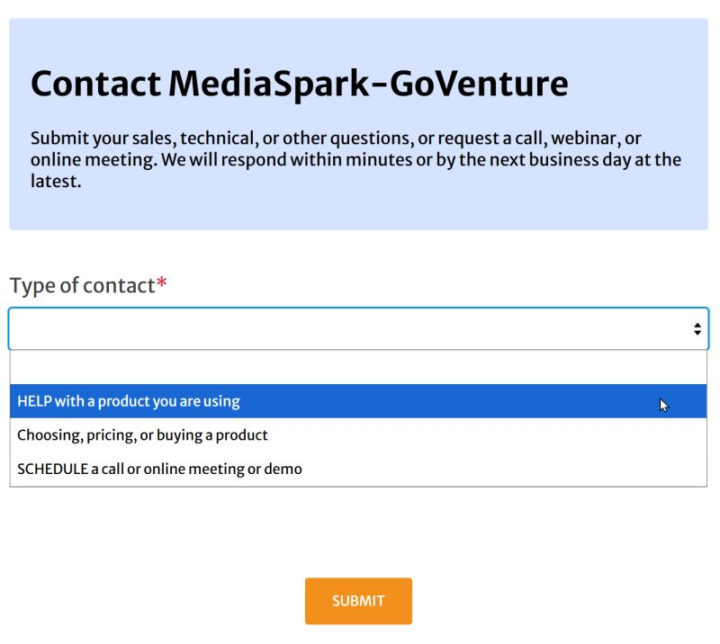
As a product designer, I’m obsessed with customer support. So much so that I set up and manage our entire support system — and monitor every request that comes into our company. That’s tens of thousands of support tickets over the years. After seeing all of that, here are a few things I recommend if you're building a support system: (1) Use a helpdesk or CRM system. If you're managing customer support from your email inbox, you're living in the caveman days. (2) Start support requests with an online form. - Forms gather the right information up front and help resolve issues faster. - They also provide redundancy since email delivery is not always reliable. - Our support form presents different fields depending on the type of request — see screenshot. (3) Build redundancy into your support email. Every request we receive is logged in three places: - A POP/IMAP mailbox - Our helpdesk/CRM system - Forwarded copies to team members If one system fails, the request still exists somewhere else. (4) Create canned responses. Most support issues repeat. Write good responses once and reuse them. (5) Use live chat internally. When multiple team members are working together, real-time communication is much faster than email. Other features you can consider include FAQs, knowledge bases, chatbots, live chat, etc., but their usefulness depends on the type of customers you serve and the support you need to provide.
1
0
Feb 23 •
Help Me Design a Board Game — Part 12
Part 12 of designing a new board game with live feedback from you — where you can influence the design. An educational board game for learning and teaching personal finance. https://books.playgoventure.com/3/newsletter/281/help-me-design-a-board-game-part-12
0
0

Jan 22 •
Business is easy to understand — but hard to do well.
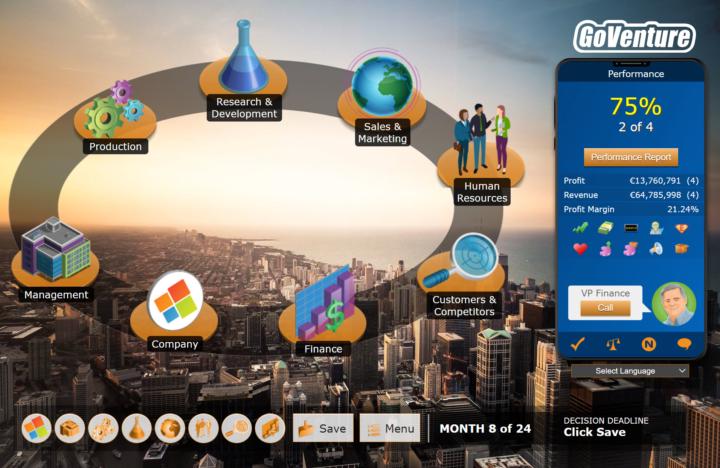
This may be one reason why so many people invest time and money to prepare to start a business, yet never actually launch one. They lack the confidence to move forward. Because when they stop learning and start doing, they run head-first into uncertainty about what to do next. One uncertainty after another becomes overwhelming. Analysis paralysis. Or the opposite — they move forward aggressively and break things along the way. Why does this happen? Because they lack business experience. But gaining this experience first in the real world requires significant time and money. The solution: play a realistic business simulation. Stop watching. Start practicing. Practice builds confidence. Confidence builds skills. Skills move you forward. PS: As a member of our businessXP community, you can click the CLASSROOM tab to access a wealth of free resources to get you started.
1 like • Jan 22
@James Raineree Pino Experiential learning for the win!

Jan 18 •
Another Insight That I Learned in GoVenture Kiosk Business Simulation
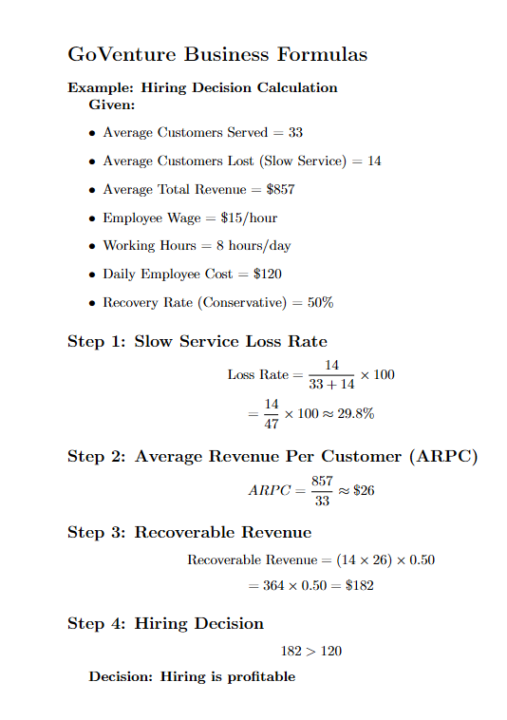
Hello everyone! I learned another valuable concept while playing the GoVenture Kiosk Business Simulation. From Slow Service Loss Rate -> Hiring Decision While going through the “1-Hour Entrepreneur Video Training” here in Skool, I remembered Sir Mathew demonstrating a situation where his kiosk business lost many customers due to slow service after marketing. He said something about considering how will we entrepreneurs know when to decide hiring an employee, so a question came up to my mind: "Does the extra revenue I gain from hiring someone exceeds the cost of paying them?" So, with the help of AI and what I’ve been learning in the simulation, I put together a simple, step-by-step way to think about this. 1. Slow Service Loss Rate First, we determine how many customers are leaving specifically because of slow service. Formula: Slow Service Loss Rate (%)= (Avg. Customers Lost due to Slow Service / (Customers Served + Customers Lost due to Slow Service)) × 100 For myself, I set a 10% threshold: - Below 10% -> normal loss, no immediate action needed - Above 10% -> investigate and consider intervention I think customer loss is unavoidable in business, but the key is knowing at what point it becomes a real problem. 2. Average Revenue Per Customer (ARPC) If the loss rate is above the threshold, the next step is to understand how much each customer is worth Formula: ARPC= Average Total Revenue / Average Customers Served This tells me how much revenue I earn per customer on average. 3. Recovery Rate This represents the percentage of lost customers I can realistically recover after hiring since not every lost customer will come back even if services improves. I decided to focus on two methods only: Method 1: Simulation-Based Recovery (After Hiring) Used after hiring, based on actual results. Formula: Recovery Rate= (New Customers Served − Old Customers Served) / Customers Lost This is the most accurate because it uses real outcomes. It answers:
0 likes • Jan 19
This is great, you are discovering and sharing the math that scares most entrepreneurs and causes them to make mistakes. One other consideration with this assessment is to first check to see if you can fix the issue by scheduling your existing employees better. There is a report that shows you the customer traffic patterns so you can predict when you need the most employees working at the same time. Another consideration is hiring employees with higher productivity and/or training them to be more productive so they can serve more employees per hour. Entrepreneurship is both art and science (and luck too :-)
1 like • Jan 19
@James Raineree Pino Everything you say above about the balance, benefit, and risk of training employees is correct. You are also right that Kiosk does not have a training option — that's in the Full Business which also has many more employees and settings. Employees also have specific skills that you need to hire for and train. We do not have management employees in GoVenture Entrepreneur because we want the player to make those decisions — just as you noted.
1-10 of 103

@mathewgeorghiou
I create games & simulations that help you gain business skills & confidence super fast. Bio— entrepreneur, engineer, inventor, writer— Georghiou.com
Active 3h ago
Joined Jan 26, 2024
INTJ
Canada
Powered by