
Write something
Pinned

30d •
Google Gemini AI Agents: Unlock 30+ Free Gems (Start Here)
Explore our Free Gemini Gem Gallery to access 30+ done-for-you AI agents designed to automate your business, teaching, and daily productivity with zero coding required. Welcome to AI Agents For Beginners (Free)! I am Diana Chen, the founder of this community.🤗 A leading AI specialist with a extensive background in helping businesses and educators implement AI easily and safely. I focus on engineering Google AI Gemini gems and mini-apps here that are immediately powerful yet completely intuitive to beginners without any code. I have developed a wide range of specialized tools for our members, from the AI Essay Grader Gem for teachers to the newly upgraded Expert Email Writer assistant. Whether you need a specific automation for your business or a new way to write emails faster, I am here to help you build it. ✅ What’s Inside our Free Gemini Gem Gallery? Our Gemini Gem Agent library is organized into specialized categories: - Business & Entrepreneurship: Specialized agents for high-converting sales copy and growth. - Content Creation & Social Media: Viral hook generators and automated SEO blog writers. - AI For Teachers & Educators: Professional lesson planners and presentation builders. - AI For Students & Study Hacks: Smart study buddies, practice quizzes, and analogies. - Personal Productivity: Virtual assistants for inbox zero management and smart writing. - Everyday Life & Home: Household managers for smart meal planning and automated budgeting.

Pinned
2d •
Free: 2026 Build Your Own AI Assistant in Gemini
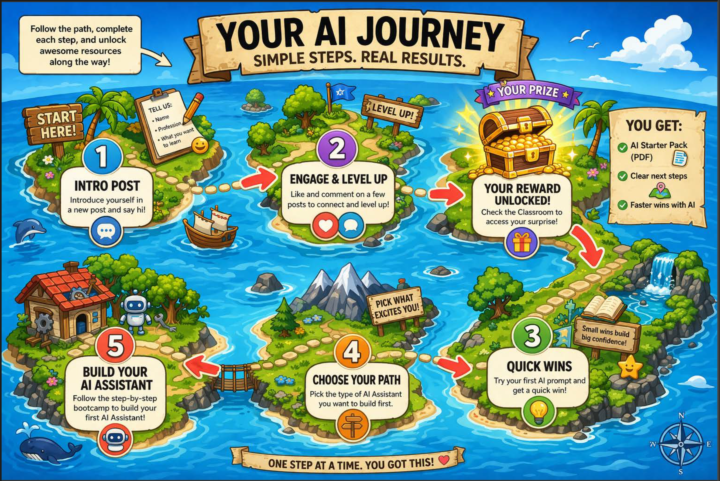
Exciting news.😃 I just launched a brand new free (Gamified) Build Your Own AI Assistant in Gemini! Getting started finally will feel clear, and actually fun! You do not need a paid Gemini account or to figure it all out on your own. I already did the heavy lifting for you, and the template is fully customizable so you can make it fit your own business or goals.🙌 Inside, you’ll be able to: ✅ Pick what kind of AI Assistant you want to build ✅ Follow the steps in order without feeling overwhelmed ✅ Customize your assistant for real tasks you want help with ✅ Finally start instead of overthinking it If you’ve been wanting to create your first AI Assistant in Gemini, this is your sign to spend only 5 minutes today creating it. I can't wait to see all of your AI assistants! Go begin here and share your win with the group to help others in our group. 🗺️ Start My Free Build Your Own AI Assistant in Gemini Course >> - Diana
Pinned
Mar 7 •
Ultimate Guide to Gemini Gems: How to Create Custom AI Assistants
Learn how to build, optimize, and use custom Google Gemini Gems to automate your workflows and ensure consistent AI results every single time. If you are still pasting the same massive prompt into Gemini every time you need to draft an email, analyze data, or brainstorm ideas, you are leaving a ton of time and efficiency on the table.🙌 Gemini Gems eliminate the issue of inconsistent AI outputs by letting you permanently lock in your best instructions. As an AI Innovation Lead with a background in UX/UI and SEO, I’ve found that mastering these custom agents is the single fastest way for beginners to bridge the gap between "messing around with AI" and actually getting professional-grade results.🤗 🔷 What Are Gemini Gems? Think of Gems as your own customized AI assistants. Instead of starting from scratch with a blank chat, you pre-load a Gem with specific instructions, a defined persona, and even your own reference documents. Once built, it lives in your sidebar, ready to execute its specific job instantly. (Note: You currently need a Gemini Advanced or premium workspace account to create and manage custom Gems.) ✅ How to Create Your First Gem in 6 Steps 1. Open the Manager: Go to the Gemini web app, look at the left sidebar, and click on Gem manager. 2. Start Fresh: Click the + New Gem button. 3. Name It: Give it a clear, action-oriented name so you know exactly what it does (e.g., SaaS Copywriter or 5K Running Coach). 4. Write the Instructions: This is the "brain" of your Gem. Provide strict rules on how to behave, what to analyze, and how to format its answers. 5. Upload Knowledge: You can upload files directly to the Gem to give it a foundation of facts. Attach your brand style guidelines, reference PDFs, or raw data spreadsheets. 6. Save & Pin: Hit save, and pin the Gem to your sidebar for one-click access. 🤩 3 Expert Tips for Professional-Level Gems - Use the PCTF Framework: Never write a vague instruction box. As a UX and SEO specialist, I recommend structuring your Gem's brain using this exact framework: - Leverage Your Own Data: Generic AI gives generic answers. A Gem becomes incredibly powerful when it stops guessing and starts reading your data. Upload your past successful reports, SOPs, or brand voice documents so it understands your specific landscape. - Iterate Like a Product Manager: Your first version will rarely be flawless. Treat your Gem like a living tool. If it spits out a summary that is too long, don't just fix it in the chat—go back into the Gem manager, edit the core instructions to say "Keep all responses under 200 words," and save it.



1-30 of 51

skool.com/ai-agents-for-beginners
Join the #1 free AI Agents for Beginners Library. Access plug-and-play Google Gemini Gems to instantly automate tasks and reduce manual work. No code.
Leaderboard (30-day)
1

+22
2

+10
3

+9
4

+8
5

+8
Powered by