
Write something
Pinned

🔥
17h •
Why the Entire AI Industry is Talking About Claude Code.
If you follow AI news, you've seen it everywhere. Everyone is talking about "Claude Code" and "building without developers." Here's what's happening: People are building custom software by describing what they need in natural language. The barrier between "I need a tool" and "I have a tool" is getting very close to coming down. Where we actually are: To be honest, the current tools will probably be more comfortable for people that program or have programmed at some point in their career. However, people that are "technical", not "programmers" are now starting to build full applications by describing what they need. People like - myself. That's new. And it shows where AI is headed. Soon, the person who knows how to fix the problem will build the solution. With natural language. Here are some real examples: Community manager: Built a tool that tracks member questions and shows what content to create. Content creator: Built a system that writes posts for different social platforms. Support lead: Built a hub where the team gets answer from an AI Agent. These people aren't developers. They just understand their workflows. And that's becoming enough. Why this is different. Past "no-code" tools made you think like a developer. With Claude Code it is becoming more and more like a conversation: - "I need to track cancellations and see why people leave. "Tool gets built. - "Can it show trends over time? "Feature gets added. You're describing, not coding. However, as stated earlier, if you're not technical, this still feels like a stretch. But tools like Claude Code are making the conversation more natural. The barrier isn't gone. But it's thin enough to see through. Why pay attention now? Just six months ago you needed to code. Today you need to understand technical concepts. Six months from now: might just need clear explanation. So no, this is not “anyone can build anything” yet. But it is the first time that people who truly understand a workflow can realistically start turning that understanding into software.
Pinned

18h •
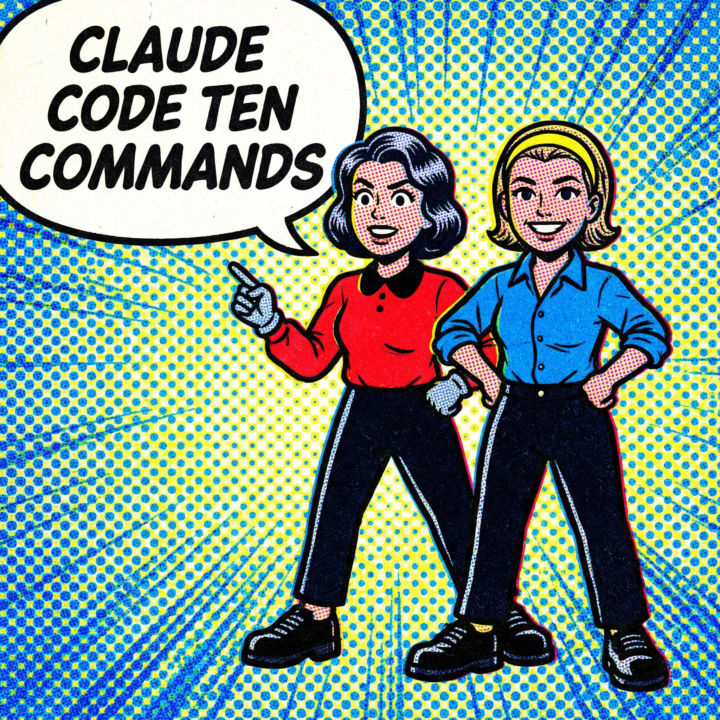
Claude Code Ten Commands You Can Use Every Day
The slash commands that actually matter, in the order you'll need them. 1. /init First thing in any new project. Creates a CLAUDE.md file where you define how your project works, what conventions to follow, what to avoid. Without this, you're re-explaining your codebase every session. With it, Claude opens the session already oriented to your codebase. 2. /compact (full disclosure, I never use this one.) Your context window is finite. When a session runs long and context quality degrades, /compact compresses everything down to the essential points and frees up space. Run this proactively before starting a new chunk of work in the same session. 3. /clear Full reset. Wipes the conversation entirely. Use it when you're switching to a completely different task and don't want bleed from the previous conversation affecting results. 4. /cost Shows your token usage and spend for the session. I check this after long sessions to understand what's actually expensive. Helps you spot when a conversation has ballooned and you should /compact or start fresh. 5. /doctor Diagnoses your Claude Code setup. Checks your config, API keys, MCP servers, permissions. When something isn't working and you can't figure out why, run this first. Saves you from chasing config problems that aren't actually code problems. 6. /memory Between sessions, Claude Code retains what you've told it. /memory lets you view, add, or remove that stored context. Build it up over time so you're not starting from scratch every conversation. 7. /config Opens your settings. Permission modes, model preferences, allowed tools. The controls that determine how Claude Code behaves at a system level. 8. /review Runs a code review on your current changes. Point it at a PR or your working diff and Claude walks through it like a reviewer. Catches things fast. 9. /resume Pick up where you left off. Shows your recent sessions and lets you jump back into any of them with full context. I use this constantly when I close a terminal and come back the next day.
Pinned
🔥
18h •
💳 Quick Tip: /extra-usage discount for Claude Code
Claude is offering an extra-usage discount you can buy on demand. How to find it: just type /extra-usage in the terminal and hit enter and it will take you to the page to buy extra usage. The pricing: - $50 → Save 10% ($45.00 total) - $250 → Save 20% - $1,000 → Save 30% - Custom amount available The bulk discounts make sense if you're in the middle of a big project and can't afford to wait. The charges go to your saved payment method immediately, so you can get back to work without interruption. Just something to know about if you see that limit warning pop up mid-project.


10h •
Why Members Quit: Using AI for Root Cause Analysis
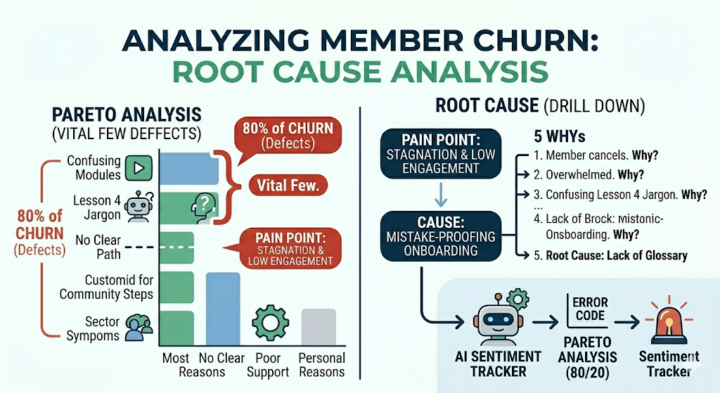
🔧LSS Tool: Root Cause Analysis (RCA) – The "5 Whys" and Pareto Chart (80/20) The Industry: Hospitality (e.g., Resort Management, Concierge) Pain Point: "A member cancels their subscription. You think, 'They just got busy.' This is a surface-level symptom. In Lean, we are not interested in the surface; we must find the Root Cause of this defect so it never happens again. You must identify the Vital Few (20%) which cause the Useful Many (80%) of your cancellations. 🥋 The White Belt Way: Perform a Root Cause Analysis (5 Whys). Contact the member and ask why they left. Don't accept "Too busy." 1. Why leave? Overwhelmed. 2. Why? Can't keep up. 3. Why? confused by Lesson 4. 4. Why? The technical jargon was too advanced. 5. Why? I haven't written a glossary of terms for that lesson. (Root Cause!). Fix that glossary and you prevent 10 future defects. Use Visual Management to highlight advanced jargon terms. [Infographic comparing Pareto Chart data with the Root Cause Analysis drill down] The AI Upgrade: Use "Sentiment Tracking" AI (OpenAI API or custom GPT). Feed all exit surveys, DMs, and community comments to the AI and ask it to: " Cluster these notes and generate a Pareto Chart. Act as an LSS Auditor and perform RCA. What are the Vital Few structural 'Defect' that is causing 80% of our churn?" • The Result: You stop puting Band-Aids on symptoms (jargon stress) and start curing the disease (no glossary)
0
0

5d •
Hello everyone 👋
I’m Kritika Gupta.I’ve been actively working with AI tools,building projects.I’m now looking to take things to the next level—what skills, tools, or areas should I focus on to grow deeper in AI.
1-30 of 347
skool.com/ai-bits-and-pieces
Build real-world AI fluency to confidently learn & apply Artificial Intelligence while navigating the common quirks and growing pains of people + AI.
Leaderboard (30-day)
1
+98
2

+37
3

+14
4

+11
5

+10
Powered by