
Pinned

1d •
IMAGINARIUM - VIBE SESSION hosted by RED PILLAR
Discussion covered platform integrations and voice synthesis examples, cited Claude and 11 Labs for automation and brand voice generation, and encouraged upskilling to automate marketing workflows with Claude and Claude Code. A prototype app to help small businesses with budgeting, forecasting, contract management, and alerts was shown and described as iterated using AI tools. The meeting reviewed Claude Skills installation and monetization options, including converting prompts to skills and productized offerings like workshops and a $500/month mastermind model. Participants asked about client data ownership and buyouts and were told the operator retains ownership via the ClawBot purchase model, with contracts covering hardware fees, termination, and data-retrieval or wipe provisions. The session closed with member updates, agreement to share core GitHub materials, and a demonstration of agent-driven Luma AI features for animation and pitch-deck automation.
Pinned
3d •
STEAL THIS PROMPT!!!! POST YOUR WORK IN THE COMMENT SECTION🧨🏆
Create a Google Street View-style screenshot in 16:9 at 1920x1080 resolution. The image should feel like an accidental street-level panorama of an occult alien temple hidden deep in the Amazon rainforest. Show a raw jungle roadside scene with dense rainforest vegetation, giant roots, humid haze, and a concealed ritual structure partially revealed through the foliage. The structure should combine black stone and biomechanical temple architecture, with monoliths, a ritual platform, alien glyphs, glowing cyan and crimson symbols, and suspended geometric relics. Add strange anomalies like blue mist, a scorched circular clearing, bent trees, shadowy silhouettes, and geometric plant patterns. Include digital noise and compression artifacts so it feels like a real documentary-style map capture. The style should be non-artistic and realistic, not cinematic. Add a top-left UI overlay that reads: “Anomalous Temple,” “Amazon Basin, Ecuador,” and “Google Street View - sept 2023.” Keep the overall result believable, with locked UI placement and the feeling of a forbidden hidden discovery captured by accident.
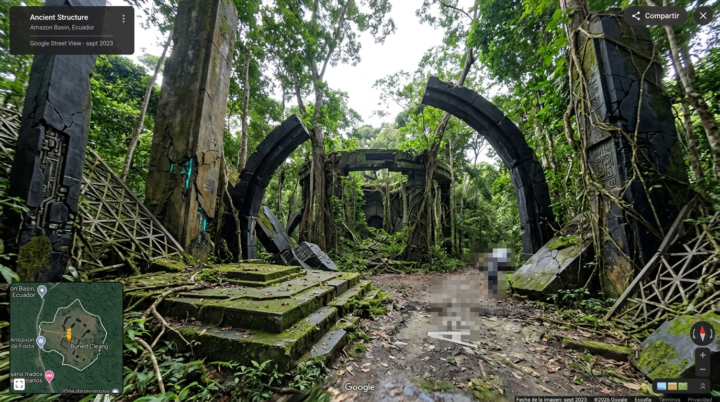
Pinned
6d •
🚨 Stop Guessing. Start Charging What You're Worth.
🔥 Stop Guessing What to Charge Clients — Use This Tool First One of the biggest reasons creators leave money on the table has nothing to do with their skills. It's not their talent. It's not even their portfolio. It's because they're guessing what to charge. So I built something for you. Introducing the Imaginarium Project Quote Calculator It takes less than 2 minutes to use. Answer 13 simple questions about your project and your client, and it instantly generates a professional quote range — the same way real agencies handle pricing. This tool factors in the following: - How big and established the client is - How urgent the deadline is - How long the project will actually take you - What paid tools you need to use - How complex the deliverable is - How skilled you are in that specific type of work - How much revenue or value you're creating for the client - And more... It gives you a range of numbers every time: A conservative quote — safe to open with A recommended quote, which would be your ideal target And a premium quote — for high-stakes, high-value work Plus a strategy tip that tells you exactly how to present the number to your client in a real conversation. Open the tool here: https://imaginariumprojectquote.netlify.app/ Run your numbers - Use the tool on your next project — or even go back and run it on your last project. 👇 Drop your Imaginarium Score in the comments after you use it. Let's normalize talking about money in here. The more we share the more we all learn 💰
4h •
Run AI on Low VRAM! ComfyUI Installation + Dynamic VRAM Update
In this ComfyUI tutorial, I’ll show you exactly how to install ComfyUI desktop and run powerful open-source AI models locally on your PC—even on low-end GPUs like the GTX 1050! 🚀 We’ll cover the full installation process, including essential dependencies like Git, Miniconda, SoX, and FFMPEG. Plus, I’ll show you how to navigate the new dashboard, use the Templates system to find free workflows, and explain the massive new Dynamic VRAM update that cuts GPU requirements in half! Stay tuned until the end for a special reveal about the AI voice used in this video! 🔗 Links Mentioned: ComfyUI Official: https://comfy.org Github Repo: https://github.com/Comfy-Org/ComfyUI Miniconda: https://www.anaconda.com/download/suc... GIT: https://git-scm.com/install/windows SoX (Sound Exchange): https://sourceforge.net/projects/sox/ FFMPEG: https://www.gyan.dev/ffmpeg/builds/ Qwen3 TTS: https://qwen.ai/blog?id=qwen3tts-0115 🔗 News Links Mentioned: Dynamic VRAM update: https://blog.comfy.org/p/dynamic-vram... 📍 Timestamps: 0:00 - Intro & What is ComfyUI? 0:18 - Download & Install ComfyUI 1:08 - Essential Dependencies (Git, Conda, FFMPEG) 2:31 - Dashboard & Interface Overview 3:52 - How to use Templates & Workflows 4:45 - Running your first Model (LTX Video) 5:31 - HUGE Update: Dynamic VRAM for Low-End GPUs 5:53 - The AI Voice Reveal (Qwen 3 TTS)
1
0

3d •
Vertical Soap: His Billion Dollar Betrayal
Here are some draft versions of a storyline for a vertical soap

1-30 of 215
powered by

skool.com/fantasy-complex-industry-3343
A community where artists and innovators explore new realities through AI, art, and collaboration. Learn, create, and unlock new realities.
Suggested communities
Powered by