
Write something

Dec '25 •
Ask Section
This is where you ask design and SolidWorks related questions. Be sure to include as much info as possible about the project you are working on, and include screenshots if possible.

Feb 8 •
Help needed with STL files / 3D-Scan
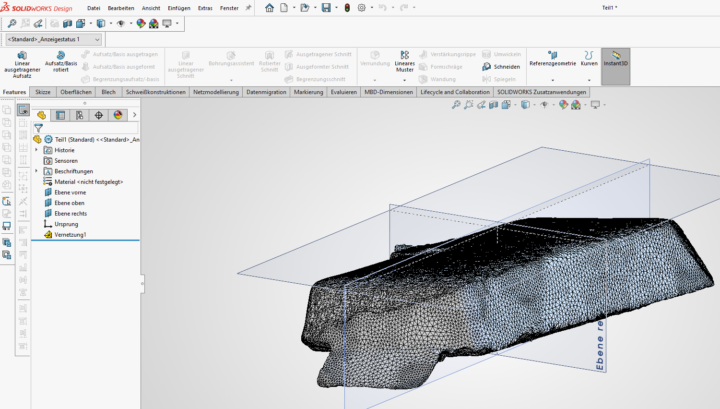
Hey guys, i need your help. I am trying to work with a 3d-scan. I already have the stl files cleaned up in the revo scan 5 software. Now i am trying to import the stl into solidworks 2026 (makers license) with the goal of reorientating it. If i import the stl without the scanto3d option activated i am not able to add a plane based on 3 points, because i can only select the hole face, not the intersection points of each polygon. When i open the stl file with the scanto3d option activated i am able to create a new plane and new koordinate system. My idea is saving the stl with my new koordinate system and set the output origin to the new created one, so my stl is oriented properly. Unforunately this doesnt work. Every time i try to save it, it either doesnt save anything or it doesnt reference it to my new koordinate system. Which means it is in the same wrong orientation... Would really appreciate i anyone has a tip how to fix this. Thanks a lot Pic1: stl imported into a new file with the scanto3d option actived (polygon lines are visible and i am able to select the knots to create a plane)
Mar 6 •
NEW VIDEO LIVE
I've got annother video posted on the latest Halftrack design. The longform video is in the free section of the Classroom, and you can see it on YT here:
0
0
Feb 18 •
HELP NEEDED - Halftrack Drive Mechanism
Do you guys think I should have the drive mechanism in the back, like a tank? Or in the front like a Motorcycle chain? VIDEO ATTACHED


Feb 8 •
File Organization
Hey all! I'm curious how does everyone organize their projects or jobs? I feel like organizations of our files is just as important as designing the parts. Especially when it comes time for revisions and manufacturing. In my line of work I design parts for my business and the other half I do job shop work for customers (3d scanning, 3d CAD and help customers find manufactures to produce their parts) For my job shop work, the folder tree starts with the Customer Name. Within their name I have their invoice or quote number of their job. Once inside the invoice or quote number I'll have a folder for engineering and manufacturing. I like to keep the original engineered part separate from the manufactured part so that I always have the original part. (saved as copy) Engineering folder will have everything related to designing that part. Ill have a folder for Hardware, References, Prints and 3mf for 3d printing prototypes. Manufacturing folder stays pretty clear with just the CAD file, STEP file and drawing. For my business, its very similar. I start with the vehicle manufacture first but it gets very much cluttered as there are lots of, vehicle models, type of part (armor, brackets, electrical), revisions, references and months to years of developing parts. I'd like to clean up my business folder so I'm curious to what everyone is doing.
1-25 of 25
powered by

skool.com/offroad-design-crew-solidworks-9132
Your go-to community for mastering SolidWorks by designing custom off-road vehicles. Learn CAD, suspension, and chassis principles.
Suggested communities
Powered by