
Pinned

4d •
Oh my... numbers are frightful
I am old enough and active enough to have been in many groups - from fishing groups, parent groups, political groups, online FB, X, youTube groups. Here is what I observe; Most groups have very few active members - especially groups that are free to join. I have seen quite a few complaints on school about their group participation rates. Sorry, but here are the facts and data. It's a well known data set about groups that follow the 90-9-1. That means you have 90 lurkers, 9 once in a while participants and 1 every day active. Is that amazing or what? There are some things you can do to increase the participation but generally you are not likely to increase active participation above 15%. My dashboard on Skool says I have 58% (of 84 school members) participation. That is BS. I can scan my commentary and know that is not true. Here is the data that Perplexity has produced For a 100-member free group on AI image creation, a practical “middle-of-the-road” forecast would be: - 90 people mostly watch and read. - 7 people contribute every few days. - 2 people show up daily. - 1 person becomes the “super-user” who comments or posts multiple times per day. That is not a hard rule, just a good planning baseline for a typical online community of this size. If you want, I can also give you a best-case, average-case, and weak-engagement scenario for a 100-member Skool group. If you want to try and increase your group participation on the Skool platform, ask chat for a plan. Prompt: Group dynamics and participation rates in a Skool group of about 100 members that join for free are low and follow the 90-9-1 rule. Give me 5 things I can do right away to increase participation in my Skool group.

Pinned

🔥
Nov '25 •
Introduction post
New or not, say hi below so we can connect and help each other win. What to share (copy + paste this): Name (or nickname): Where you’re based: What you’re into right now: What you’re building/learning: One thing you need help with: One thing you can help others with: Skool or socials: A fun fact: Guidelines (quick + kind): Be real, be respectful. Give before you take: reply to 2 intros you vibe with. If you have your own Skool, share it—tell us who it’s for in one sentence. Icebreakers if you’re stuck: Current tiny win this week? A tedious task you want to automate? A tool/template you’ve loved lately? Example: Name: Manda (Skill & Soul Studio) Location: QLD, Australia Into: Calm systems, tiny digital tools, beginner-friendly AI Building: AI Team Need help with: Promo ideas that aren’t spammy Can help with: Interactive PDFs, simple AI helpers, tidy templates Fun fact: I collect pastel planners like they’re Pokémon 😅 Head to the classroom Start Here



🔥
13h •
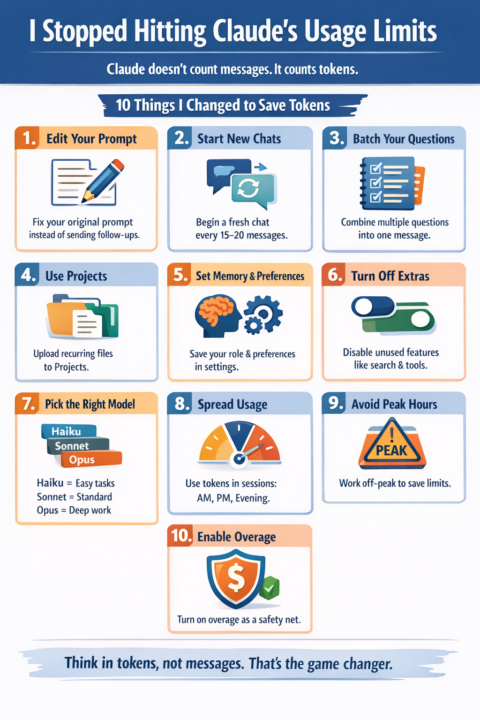
Keep hitting Claude’s usage limits.
Turns out… it's not the model. It is how I am using it. Turns out Claude doesn’t count messages. It counts tokens. Once that clicked, everything changed. Here are 10 things that make a massive difference: 1. Edit your prompt instead of sending follow-ups If the response is off, don’t send: “No, I meant…” or “That’s not right…” Every extra message gets added to history. Claude re-reads ALL of it every time. Token cost grows fast: At ~500 tokens per exchange 5 messages = ~7.5K tokens 10 messages = ~27.5K tokens 20 messages = ~105K tokens 30 messages = ~232K tokens Instead: edit your original prompt and regenerate. You replace the history instead of stacking it. 2. Start a new chat every 15 to 20 messages Long chats are expensive. Most tokens get burned re-reading old context, not generating new output. One dev tracked usage: 98.5% tokens = re-reading history 1.5% = actual output Fix: Ask Claude to summarise → copy → start fresh chat → paste summary. 3. Batch your questions Stop sending multiple messages. Bad: “Summarise this” “Now list points” “Now give a headline” Better: “Summarise this, list key points, and suggest a headline.” One prompt = one context load. 4. Use Projects for repeat files Uploading the same file repeatedly = repeated token cost. Projects cache your files. Upload once → reuse without re-tokenising. If you use PDFs, briefs, or docs often, this alone saves a lot. 5. Set Memory and Preferences If you keep typing: “Act as…” “I’m a…” “I write like…” You’re wasting tokens every time. Save it once in settings. Claude remembers it. 6. Turn off unused features Search, connectors, advanced thinking all add token cost. If you didn’t intentionally turn it on, turn it off. 7. Use the right model Not everything needs power. Haiku → quick, cheap tasks Sonnet → standard work Opus → deep thinking Most people overuse powerful models and burn budget fast. 8. Spread usage across the day Claude uses a rolling 5-hour window. If you burn everything in one session, you waste the rest of your day.

1-30 of 403
powered by

skool.com/skill-soul-studio-7220
Learn simple, AI tools and systems that help you work smarter, stay calm, and grow with ease.
Suggested communities
Powered by