
Pinned

Mar 2 •
Start Here: Your Women's Tech Integration Collaborative Success Path
Welcome to the Women’s Technology Integration Collaborative (henceforth to be referred to as WTIC because I don't have the time to type out "Women’s Technology Integration Collaborative" over and over.... If you are here, you are in the right room. This community exists to help accomplished women move from tech confusion to confident implementation. Start here. Step 1. Introduce yourself below. (Everybody) In the comments of this post, share: • what you do • where you feel most confident (business or tech) • where you would most like support right now This helps me and the community meet you where you are. Step 2. Explore the Training Library (Free, Premium and VIP members) Start with the curated sessions in the classroom. Do not try to watch everything. Pick one area that will move your work forward now. Step 3. Join the Live Sessions (Premium and VIP Members) We meet on the second and fourth Tuesday of each month for 90 minutes. Second Tuesday: Expert Session Fourth Tuesday: Integration Lab where we apply what you are learning and troubleshoot in real time. Step 4. Use the Prompt Drops and GPTs These are designed to save you time. Test them. Adapt them. Use them in your real workflow. They will be updated and added to regularly Step 5. Be Active The women who get the biggest results here participate. Ask questions. Share wins. Bring your stuck points. Active members may receive bonus opportunities, invitations, and upgrade options. Most importantly - remember - you are not behind. You are building!!!! Let's GOOOOOOOOOOO :) Viveka

Pinned
12d •
HOW TO UPGRADE TO PREMIUM
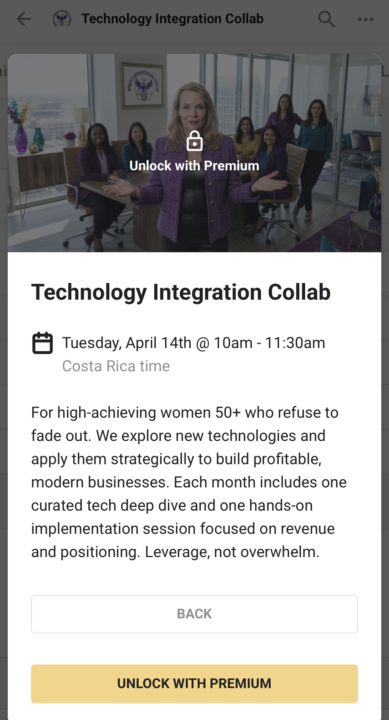
Upgrading inside WTIC is simple and only takes a minute. Here’s how it works: STEP 1: Click on a Locked Training or Event When you’re browsing the Classroom or Calendar, you’ll see some sessions marked as locked. These are Premium-only trainings, including: • Live expert sessions • Integration Labs • Full training library content 👉 Simply click on any locked item. STEP 2: Review What You’ll Unlock After clicking, you’ll see a page that shows what’s included with Premium access. This typically includes:• Live twice-monthly sessions• Full training library• Deeper implementation support STEP 3: Choose Your Plan You’ll be prompted to select your upgrade option. Options may include:• Monthly plan• Annual plan (best value) Select the option that works best for you. STEP 4: Complete Your Upgrade Enter your payment details and confirm. Once you upgrade, you’ll immediately unlock:• All locked trainings• Upcoming live sessions• Full access to the Classroom No waiting. No approval step. WHAT TO DO NEXT After upgrading: • Go back to the training or event you wanted • Add upcoming sessions to your calendar • Start with one training and bring your questions to the next Integration Lab IMPORTANT NOTE If you’re not quite ready, that’s completely fine. You’ll still have access to: • Selected trainings • Community discussions • Prompt drops and tools And you can upgrade anytime by clicking on any locked session.
4
0
Pinned
Mar 6 •
Would you like some LinkedIn Love?
If you'd like your sisters to help promote your content - pop the link in comments below. But before you do that, watch the LinkedIn 360 Brew Sessions in the classroom (https://www.skool.com/womens-tech-collaborative-2106/classroom/88bcddf8) to find our WHY you need to engage in your swim lane... and how to get even more engagement on your posts.
2d •
Claude for Beginners
So -I've already built some pretty amazing apps thanks to @Barb Miller and her Vibe-Coding class I took (and yes - she is going to do one for us too.). But I did my usual "jump in with both feet before I really knew how deep it was"... and so I spent the day watching a bunch of beginner videos. I popped my favorite resources into the Claude Tutorial for Beginners class. Check it out of you are new to Claude. I'll continue to add things as I find them.
2d •
Whats up with AI Search? (on LinkedIn and online?)
On April 6 at noon MST, Diane Whiddon and I are going to break down what’s actually happening behind the algorithms and how AI is reshaping what gets seen, ranked, and clicked. You’ll learn: ✔️ How AI-driven search is changing content discovery and SEO strategy ✔️ What LinkedIn’s algorithm now prioritizes and what it quietly ignores ✔️ How to create content that gets surfaced, not buried ✔️ Where most experts are wasting time and what to do instead If you haven't signed up yet - click below https://www.linkedin.com/events/7445507539905183747?viewAsMember=true
2
0
1-6 of 6
powered by

skool.com/womens-tech-collaborative-2106
WTIC is an implementation collaborative for women 50+ building their next chapter with the right technology, clear strategy, and steady support.
Suggested communities
Powered by