Activity
Mon
Wed
Fri
Sun
May
Jun
Jul
Aug
Sep
Oct
Nov
Dec
Jan
Feb
Mar
Apr
What is this?
Less
More
Owned by Marco
Global Community Calendar - Group Chat - Voice Messages - Bold Text - Browser Notifications - Bookmarks - Member Lists - Copy Page To Module
KI verändert die Welt. Verpasse das nicht. Starte noch heute dein eigenes KI Business 🚀
Memberships
70 contributions to Skool Extensions 🧩

15h •
How does the Landingpage look like?
Maybe I have missed it but on the plans it says, that there are landingpages, but I haven't seen a post about it or how they look like? @Marco Berlin


🔥
1 like • 11h
Hey Adriana, the VIP features, are not completely ready yet. Probably they will be finished in 1-2 months. I‘m preparing a list for these things. The landingpage will be a ai build landingpage connected to your community. Things like good posts, classroom preview or the current calendar can go into the landingpage automatically. Everybody who is interested in VIP in future can tell me. The first people will put their ideas into these additional community products.
🔥
22d •
🆕 Release Notes
Check here for all the latest news on the upcoming update. Hit the bell 🔔 icon to receive a Skool notification whenever a new update is released. --- Hier findest du alle Neuigkeiten zum kommenden Update. Klick auf die Glocke 🔔, um eine Skool-Benachrichtigung zu erhalten, sobald ein neues Update veröffentlicht wird.
🔥
1 like • 4d
𝗥𝗲𝗹𝗲𝗮𝘀𝗲 𝗡𝗼𝘁𝗲𝘀 𝘃𝟭.𝟯.𝟭 ⭐ 𝗙𝗮𝘃𝗼𝗿𝗶𝘁𝗲 𝗖𝗼𝗺𝗺𝘂𝗻𝗶𝘁𝗶𝗲𝘀 - Choose up to 5 favorite communities in Settings → Tools - Also shown in the welcome popup so new users can pick favorites right away - Selected favorites are used as the default filter for Stream and Calendar panels - Synced across devices via Cloud Sync 🔔 𝗦𝗺𝗮𝗿𝘁𝗲𝗿 𝗡𝗼𝘁𝗶𝗳𝗶𝗰𝗮𝘁𝗶𝗼𝗻𝘀 - Desktop notifications now show the sender's profile picture with a Skool badge - Skool notifications can be filtered by type: Mentions, Comments, Following, Requests, New Posts, Recordings - Duplicate notifications are suppressed — each alert fires only once - Notifications are now fetched via API instead of DOM scraping (faster, more reliable) 🎓 𝗕𝘂𝗹𝗸 𝗚𝗿𝗮𝗻𝘁 𝗖𝗼𝘂𝗿𝘀𝗲 𝗔𝗰𝗰𝗲𝘀𝘀 - Grant course access to all filtered members at once from the Members Panel - Paste a classroom URL, load the course, and grant with one click - Progress indicator shows how many members have been processed --- ⭐ 𝗟𝗶𝗲𝗯𝗹𝗶𝗻𝗴𝘀-𝗖𝗼𝗺𝗺𝘂𝗻𝗶𝘁𝘆𝘀 - Bis zu 5 Lieblings-Communitys unter Einstellungen → Tools auswählen - Auch im Willkommens-Popup sichtbar, sodass neue Nutzer sofort ihre Favoriten wählen können - Ausgewählte Favoriten werden als Standardfilter für Stream und Kalender verwendet - Über Cloud Sync geräteübergreifend synchronisiert 🔔 𝗜𝗻𝘁𝗲𝗹𝗹𝗶𝗴𝗲𝗻𝘁𝗲𝗿𝗲 𝗕𝗲𝗻𝗮𝗰𝗵𝗿𝗶𝗰𝗵𝘁𝗶𝗴𝘂𝗻𝗴𝗲𝗻 - Desktop-Benachrichtigungen zeigen jetzt das Profilbild des Absenders mit Skool-Badge - Skool-Benachrichtigungen nach Typ filterbar: Erwähnungen, Kommentare, Folge ich, Anfragen, Neue Beiträge, Aufnahmen - Doppelte Benachrichtigungen werden unterdrückt — jede Meldung erscheint nur einmal - Benachrichtigungen werden jetzt per API statt DOM-Scraping abgerufen (schneller, zuverlässiger) 🎓 𝗠𝗮𝘀𝘀𝗲𝗻-𝗞𝘂𝗿𝘀𝘇𝘂𝗴𝗮𝗻𝗴 - Kurszugang für alle gefilterten Mitglieder auf einmal aus dem Mitglieder-Panel vergeben - Classroom-URL einfügen, Kurs laden und mit einem Klick freischalten - Fortschrittsanzeige zeigt, wie viele Mitglieder bereits verarbeitet wurden
🔥
1 like • 1d
𝗥𝗲𝗹𝗲𝗮𝘀𝗲 𝗡𝗼𝘁𝗲𝘀 𝘃𝟭.𝟯.𝟮- in review 🤖 𝗔𝗜 𝗖𝗵𝗮𝘁𝗯𝗼𝘁 - New AI chatbot in the Skool Extensions community — answers all questions about the extension - Floating widget in the bottom-left corner, available on every page within the community - Chat history is saved and restored on your next visit (up to 30 days) 📊 𝗟𝗶𝘃𝗲𝗖𝗮𝗹𝗹 𝗔𝘁𝘁𝗲𝗻𝗱𝗮𝗻𝗰𝗲 𝗥𝗲𝗽𝗼𝗿𝘁 - After a live call ends, a visual attendance report appears on the feedback page - Shows participants, average attendance, and call duration at a glance - Each participant lists join/leave time, attended minutes, and attendance percentage with color-coded bars - Copy the full report to clipboard with one click for easy sharing 📰 𝗦𝘁𝗿𝗲𝗮𝗺 𝗣𝗮𝗻𝗲𝗹 — 𝗦𝗺𝗼𝗼𝘁𝗵 𝗥𝗲𝗳𝗿𝗲𝘀𝗵 - Auto-refresh now uses diff-based updates — no more flickering or scroll reset - New posts fade in, deleted posts fade out, existing posts update in place - Upvotes, comments, and unread indicators refresh without re-rendering the entire list 🔧 𝗜𝗺𝗽𝗿𝗼𝘃𝗲𝗺𝗲𝗻𝘁𝘀 - Calendar: events are cached for 24 hours and persist across page reloads — much faster loading - CRM: save confirmation toast when updating profiles, tags, or pipeline - Profile context menu (dots button) is now always available, even without tags or pipeline --- 🤖 𝗔𝗜 𝗖𝗵𝗮𝘁𝗯𝗼𝘁 - Neuer KI-Chatbot in der Skool Extensions Community — beantwortet alle Fragen rund um die Extension - Schwebendes Widget unten links, auf jeder Seite innerhalb der Community verfügbar - Chatverlauf wird gespeichert und beim nächsten Besuch wiederhergestellt (bis zu 30 Tage) 📊 𝗟𝗶𝘃𝗲𝗖𝗮𝗹𝗹 𝗧𝗲𝗶𝗹𝗻𝗮𝗵𝗺𝗲-𝗔𝘂𝘀𝘄𝗲𝗿𝘁𝘂𝗻𝗴 - Nach Ende eines Live Calls erscheint eine visuelle Teilnahme-Auswertung auf der Feedback-Seite - Zeigt Teilnehmer, durchschnittliche Teilnahme und Call-Dauer auf einen Blick - Jeder Teilnehmer listet Eintritt/Austritt, Minuten und Teilnahme-Prozent mit farbcodierten Balken - Kompletten Report mit einem Klick in die Zwischenablage kopieren 📰 𝗦𝘁𝗿𝗲𝗮𝗺 𝗣𝗮𝗻𝗲𝗹 — 𝗙𝗹ü𝘀𝘀𝗶𝗴𝗲𝗿 𝗥𝗲𝗳𝗿𝗲𝘀𝗵 - Auto-Refresh nutzt jetzt Diff-basierte Updates — kein Flackern oder Scroll-Reset mehr


🔥
1 like • 2d
Super, dass du dabei bist. Das Ding lebt aktuell extrem durch Empfehlungen.
🔥
1 like • 1d
@Niklas Schröer Das wird sich bestimmt ändern. Hab da schon ein paar Idee.
🔥
6d •
Classroom Checklists (Admin Feature 👑)
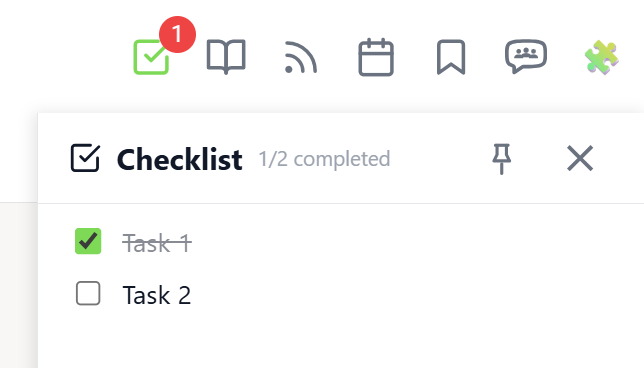
𝗖𝗹𝗮𝘀𝘀𝗿𝗼𝗼𝗺 𝗖𝗵𝗲𝗰𝗸𝗹𝗶𝘀𝘁𝘀 — 𝗔𝗱𝗺𝗶𝗻-𝗖𝗿𝗲𝗮𝘁𝗲𝗱 𝗧𝗮𝘀𝗸 𝗟𝗶𝘀𝘁𝘀 𝗳𝗼𝗿 𝗖𝗹𝗮𝘀𝘀𝗿𝗼𝗼𝗺 𝗣𝗮𝗴𝗲𝘀 Keep your members on track with structured task lists on individual classroom pages. Classroom Checklists let admins create, edit, reorder, and delete tasks that appear directly in the Course Overview panel — giving members a clear view of what needs to be done for each lesson. Open the Course Overview panel and expand a module. Pages that have tasks show a small checklist icon next to their title. Click a page row to reveal its checklist. Each task displays a completion progress bar showing how many members have completed it (e.g. "12/25 (48%)"). Hover over the bar to see the names of members who completed the task. Admins can add new tasks using the input field below the task list. Existing tasks can be edited inline by clicking the pencil icon, reordered by drag & drop, or deleted with the trash icon. Edit and delete buttons appear on hover to keep the interface clean. The feature requires the "Online Features" consent (shared with Group Chat) because checklist data is stored on the server. Task progress is tracked per member and synced across devices. The checklist integrates with the existing Course Overview panel — no separate panel needed. Classroom Checklists can be toggled in the Toolkit Settings under Features. The feature is available on any classroom page within your community. --- 𝗖𝗹𝗮𝘀𝘀𝗿𝗼𝗼𝗺 𝗖𝗵𝗲𝗰𝗸𝗹𝗶𝘀𝘁𝗲𝗻 — 𝗔𝘂𝗳𝗴𝗮𝗯𝗲𝗻𝗹𝗶𝘀𝘁𝗲𝗻 𝗳ü𝗿 𝗖𝗹𝗮𝘀𝘀𝗿𝗼𝗼𝗺-𝗦𝗲𝗶𝘁𝗲𝗻 𝘃𝗼𝗻 𝗔𝗱𝗺𝗶𝗻𝘀 𝗲𝗿𝘀𝘁𝗲𝗹𝗹𝘁 Halte deine Mitglieder auf Kurs mit strukturierten Aufgabenlisten auf einzelnen Classroom-Seiten. Classroom Checklisten ermöglichen es Admins, Aufgaben zu erstellen, zu bearbeiten, neu zu sortieren und zu löschen, die direkt im Kursübersicht-Panel angezeigt werden — so sehen Mitglieder auf einen Blick, was für jede Lektion zu tun ist. Öffne das Kursübersicht-Panel und klappe ein Modul auf. Seiten mit Aufgaben zeigen ein kleines Checklisten-Icon neben dem Titel. Klicke auf eine Seitenzeile, um die Checkliste aufzuklappen. Jede Aufgabe zeigt einen Fortschrittsbalken mit der Anzahl der Mitglieder, die sie abgeschlossen haben (z.B. „12/25 (48%)"). Hover über den Balken, um die Namen der Mitglieder zu sehen, die die Aufgabe erledigt haben.
🔥
0 likes • 3d
@Wolfgang Brodowski So ist das auch nicht gedacht. Die sollen nicht mit Absicht dort hängen bleiben. Die waren bei dir vermutlich vor der Umstellung aktiviert und haben sich jetzt nicht automatisch deaktiviert. Auf welcher Version bist du?
🔥
0 likes • 3d
@Wolfgang Brodowski Ist jedenfalls ein bug. Wird gefixt.
🔥
15d •
Cloud Sync
𝗖𝗹𝗼𝘂𝗱 𝗦𝘆𝗻𝗰 — 𝗦𝘆𝗻𝗰 𝗦𝗲𝘁𝘁𝗶𝗻𝗴𝘀 𝗔𝗰𝗿𝗼𝘀𝘀 𝗗𝗲𝘃𝗶𝗰𝗲𝘀 Using Skool Extensions on multiple browsers or devices? Cloud Sync lets you keep everything in sync — your settings, bookmarks, member tags, and text templates are encrypted and stored on our server so you can restore them anywhere. When you enable Cloud Sync in the settings panel, you'll be asked to create a passphrase. This passphrase is used to encrypt all your data with AES-256-GCM before it leaves your browser. We never see your data in plain text — only you can decrypt it. On a new browser, install the extension and enable Cloud Sync. If existing data is found on the server, you'll be prompted to enter your passphrase. Once verified, all your settings are restored instantly — no manual setup needed. What gets synced: - All toolkit settings and preferences - Your bookmarks - Your member tags and assignments - Your text templates - Your notification preferences - Your language setting You can change your passphrase at any time from the settings panel. If you forget your passphrase, you can reset Cloud Sync — this deletes server data, preserves your local settings, and lets you start fresh with a new passphrase. Cloud Sync works alongside Chrome's built-in sync. While chrome.storage.sync handles basic settings within the same browser profile, Cloud Sync extends this across different browsers, profiles, and devices — all protected by your passphrase. The feature can be toggled on or off in the Toolkit Settings under the Cloud Sync section. A consent entry is also shown in the Data & Privacy section. --- 𝗖𝗹𝗼𝘂𝗱 𝗦𝘆𝗻𝗰 — 𝗘𝗶𝗻𝘀𝘁𝗲𝗹𝗹𝘂𝗻𝗴𝗲𝗻 𝗴𝗲𝗿ä𝘁𝗲ü𝗯𝗲𝗿𝗴𝗿𝗲𝗶𝗳𝗲𝗻𝗱 𝘀𝘆𝗻𝗰𝗵𝗿𝗼𝗻𝗶𝘀𝗶𝗲𝗿𝗲𝗻 Du nutzt Skool Extensions auf mehreren Browsern oder Geräten? Cloud Sync hält alles synchron — deine Einstellungen, Lesezeichen, Mitglieder-Tags und Textvorlagen werden verschlüsselt auf unserem Server gespeichert, damit du sie überall wiederherstellen kannst. Wenn du Cloud Sync in den Einstellungen aktivierst, wirst du gebeten, eine Passphrase zu erstellen. Diese Passphrase verschlüsselt alle deine Daten mit AES-256-GCM, bevor sie deinen Browser verlassen. Wir sehen deine Daten nie im Klartext — nur du kannst sie entschlüsseln.
🔥
1 like • 3d
@Wolfgang Brodowski Ja, gehe ich von aus. Gern einmal testen. Bist ja für die Firefoxversion der Betatester 😉 Das sind nur die Extension Settings. Werden verschlüsselt mit einer cloud-DB synchronisiert. Die Browser-Syncs reichen hier oftmals von der Kapazität und Stabilität nicht aus.
1-10 of 70

🔥
@marcoberlin
🧩 skool-extensions.com - Global Community Calendar - Group Chat - Voice Messages - Bold Text - Browser Notifications - Bookmarks - Member Lists
Active 11h ago
Joined Mar 12, 2025
ISTJ
Berlin
Powered by