
Write something
Pinned

🔥
26d •
🧩 Skool Extensions starting
skool-extensions.com I’m officially releasing my Skool Extensions! 🥳 Install the extension, give me your feedback and ideas, and spread the word! --- Hiermit veröffentliche ich offiziell meine Skool Chrome Extension 🥳 Installier dir die Extension, geb mir Feedback und Ideen und erzählt es weiter.

Pinned
🔥
21d •
🆕 Release Notes
Check here for all the latest news on the upcoming update. Hit the bell 🔔 icon to receive a Skool notification whenever a new update is released. --- Hier findest du alle Neuigkeiten zum kommenden Update. Klick auf die Glocke 🔔, um eine Skool-Benachrichtigung zu erhalten, sobald ein neues Update veröffentlicht wird.

9h •
How does the Landingpage look like?
Maybe I have missed it but on the plans it says, that there are landingpages, but I haven't seen a post about it or how they look like? @Marco Berlin

🔥
23d •
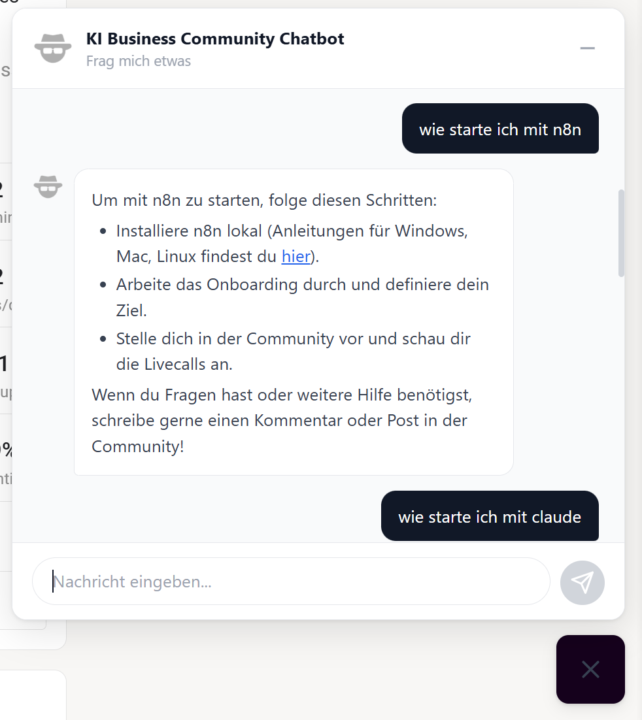
AI Chatbot Widget (VIP)
𝗔𝗜 𝗖𝗵𝗮𝘁𝗯𝗼𝘁 — 𝗬𝗼𝘂𝗿 𝗖𝗼𝗺𝗺𝘂𝗻𝗶𝘁𝘆 𝗔𝘀𝘀𝗶𝘀𝘁𝗮𝗻𝘁 The AI Chatbot is a context-aware assistant built right into your Skool community. It sits as a small button in the bottom-right corner of the page — click it to open a chat window where you can ask questions about the community, its content, and more. The chatbot understands the context of the community you're in and provides relevant answers. Your conversation history is automatically saved for 30 days, so you can pick up where you left off. The chat supports formatted text including bold, italic, code snippets, and clickable links. Type your question, hit Enter, and get an answer. Use Shift+Enter for line breaks in longer messages. The chatbot adapts to your current theme (dark or light mode) and only appears in communities where it's been enabled. --- 𝗔𝗜 𝗖𝗵𝗮𝘁𝗯𝗼𝘁 — 𝗗𝗲𝗶𝗻 𝗖𝗼𝗺𝗺𝘂𝗻𝗶𝘁𝘆-𝗔𝘀𝘀𝗶𝘀𝘁𝗲𝗻𝘁 Der AI Chatbot ist ein kontextbezogener Assistent, der direkt in deine Skool-Community integriert ist. Er sitzt als kleiner Button in der unteren rechten Ecke der Seite — klick darauf, um ein Chat-Fenster zu öffnen, in dem du Fragen zur Community, deren Inhalten und mehr stellen kannst. Der Chatbot versteht den Kontext der Community, in der du dich befindest, und liefert relevante Antworten. Dein Gesprächsverlauf wird automatisch 30 Tage lang gespeichert, sodass du dort weitermachen kannst, wo du aufgehört hast. Der Chat unterstützt formatierten Text inklusive Fettschrift, Kursivschrift, Code-Snippets und klickbare Links. Tippe deine Frage ein, drücke Enter und erhalte eine Antwort. Nutze Shift+Enter für Zeilenumbrüche in längeren Nachrichten. Der Chatbot passt sich an dein aktuelles Theme (Dark oder Light Mode) an und erscheint nur in Communities, in denen er aktiviert wurde.
🔥
22d •
Next Feature ?
Guys, the possibilities right now are insane! I’ve built a setup that lets me develop awesome new Skool features at lightning speed to make our daily Skool life so much better. Share your wildest ideas below! 👇🏼 --- Leute, die Möglichkeiten sind gerade unglaublich. Ich hab jetzt ein Setup, mit dem ich im rasenden Tempo geiles Zeug an Skool ranentwickeln kann und uns so den Skool Alltag versüßen kann. Teilt hier eure wilden Ideen 👇🏼

1-30 of 72

skool.com/skool-extensions
Global Community Calendar - Group Chat - Voice Messages - Bold Text - Browser Notifications - Bookmarks - Member Lists - Copy Page To Module
Leaderboard (30-day)
1

🔥
+69
2

+65
3

🔥
+48
4

🔥
+47
5

🔥
+42
Powered by