
Write something
Pinned

1d •
After moving to Kubernetes for Home Lab I STILL run Docker. How about you?
I Still Run These Docker Containers Every Day in 2026 (After Moving to Kubernetes) https://www.virtualizationhowto.com/2026/04/i-still-run-these-docker-containers-every-day-in-2026-after-moving-to-kubernetes/
Pinned
2d •
My journey: Docker vs Kubernetes in the Home lab and why I migrated
Anyone migrating from Docker to Kubernetes this year? I Replaced Docker with Kubernetes in My Home Lab and It Wasn’t What I Expected #dockervskubernetes #homelab https://www.virtualizationhowto.com/2026/04/i-replaced-docker-with-kubernetes-in-my-home-lab-and-it-wasnt-what-i-expected/
Pinned
3d •
Anyone running their own S3 storage in the home lab? Tried RustFS?
I recently spun up an instance of RustFS. Going to migrate away from MinIO since the licensing change. Check out my thoughts here: I Built My Own S3 Storage in My Home Lab (And It Actually Works) https://www.virtualizationhowto.com/2026/04/i-built-my-own-s3-storage-in-my-home-lab-and-it-actually-works/


52m •
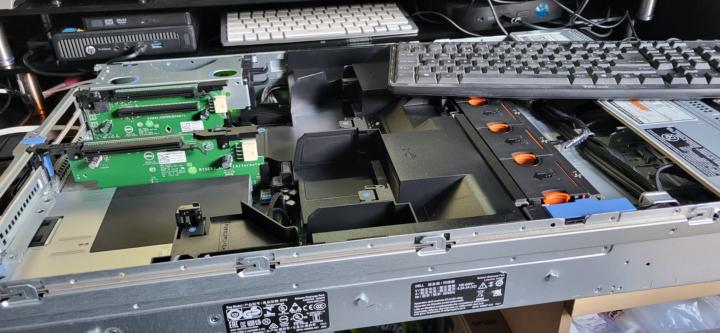
Easter Hardware Engineering
Dell Poweredge R730 arrived. Second Processor and Heatsink installation, RAM upgrades from my stash. Finally Proxmox installation.
0
0

19h •
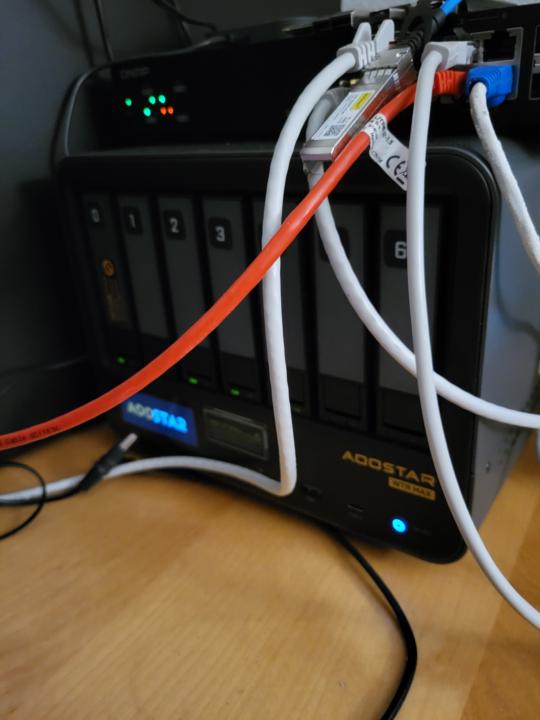
New toy new possibilities
A few days ago, I welcomed my new toy: an Aoostar WTR Max 8845HS. I must say, the hardware layout of this PC/NAS is impressive. It’s an 11-bay box, including 5x NVMe slots, and four intel nics 2spf+10gb intel 710 and 2 x2.5 I226-V nics , no pci but ...oculink. I managed to get 80GB of ECC memory through the Aoostar site. Unfortunately, 96GB wasn't available, so 64GB runs in dual channel while the remaining 16GB does not. Still, I figured 80GB is better than 64GB. I already have a Lenovo P520 running Proxmox, but since I have more time on my hands now that I’m retired, I thought this would be a fun project. My plan: install Proxmox and run PBS (Proxmox Backup Server) and TrueNAS Scale as VMs, using PCI passthrough for the SATA controller and the remaining 4 NVMe drives for Proxmox or as a ZFS cache for TrueNAS. The possibilities with this box are endless; I’ll have to give it some more thought. Anyway, after securing my data from my Synology DS923+ and moving it to my TrueNAS Scale zpool, I wanted to take it a step further: why not link the two Proxmox servers in a cluster? However, a cluster with a 10-year-old Xeon and a relatively new AMD CPU seemed unwise for running VMs on the hosts (CPU). I’d have to set everything to x86-64-v2-AES for safety, and I can forget about live migration anyway.( cold migration yes I can do). "By forcing a modern AMD CPU to behave like an old Xeon (via v2-AES), you lose access to modern accelerators like AVX-512 or other performance enhancements that the new chip offers." So, I’m putting that idea on ice for now. Since my Aoostar "passes through" all drives to the TrueNAS Scale server, I decided it would be wiser to store the PBS backups on a local NVMe rather than on the TrueNAS zpool. The thought of something happening to TrueNAS or its pool gave me the jitters. I know you can import a zpool into a new TrueNAS server without an explicit export—perhaps losing only the last few seconds of data—but still. To avoid cluttering my desk with hardware, I decided to also run PBS on my existing Lenovo P520 Proxmox server. Not to backup from there, but to use the datastore to sync backups from the Aoostar’s NVMe drive to a directory on my zpool there. You might think I’m crazy, but my most critical data is also stored on an external hard drive and secured in the cloud. Am I paranoid?
1
0
1-30 of 450

skool.com/homelabexplorers
Build, break, and master home labs and the technologies behind them! Dive into self-hosting, Docker, Kubernetes, DevOps, virtualization, and beyond.
Leaderboard (30-day)
1

+27
2
+26
3

+14
4

+13
5

+8
Powered by