Activity
Mon
Wed
Fri
Sun
May
Jun
Jul
Aug
Sep
Oct
Nov
Dec
Jan
Feb
Mar
Apr
What is this?
Less
More
Owned by Kamil
"It is a shame for a man to grow old without seeing the beauty and strength of which his body is capable"
Memberships
🏁 UNDETERRED
690 members • Free
9 contributions to Skool Extensions 🧩

🔥
13h •
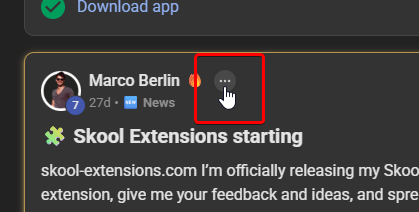
Can we please get rid of this?
For the past few days, this thing next to everyone's names has been annoying and I couldn't find a way to hide it (besides using another extension to hide elements from the website). It has been also bugging how the leaderboards look. What is it supposed to do anyway?

🔥
10d •
Calendar Helpers (Admin Feature 👑)
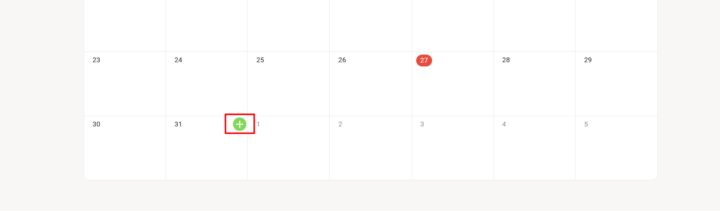
𝗖𝗮𝗹𝗲𝗻𝗱𝗮𝗿 𝗛𝗲𝗹𝗽𝗲𝗿𝘀 — 𝗤𝘂𝗶𝗰𝗸-𝗖𝗿𝗲𝗮𝘁𝗲 𝗘𝘃𝗲𝗻𝘁𝘀 𝗳𝗿𝗼𝗺 𝘁𝗵𝗲 𝗖𝗮𝗹𝗲𝗻𝗱𝗮𝗿 𝗚𝗿𝗶𝗱 Creating events in Skool means clicking the "+" button, then manually picking a date and adjusting the duration every single time. Calendar Helpers streamlines this by adding a quick-create button directly to each day in your calendar grid. Hover over any day cell and a small green "+" button appears in the top-right corner. Click it and the native event creation modal opens with the correct date already pre-selected and the duration automatically set to one hour. No more scrolling through date pickers or fixing default values — just hover, click, and start filling in your event details. The feature intelligently handles month boundaries, so days from the previous or next month shown in the grid work just as reliably. Everything happens through Skool's own event modal, so your events are created natively with no workarounds. Calendar Helpers is available for community admins and owners. Toggle it on or off in the Admin Features section of the Toolkit Settings. --- 𝗞𝗮𝗹𝗲𝗻𝗱𝗲𝗿-𝗛𝗲𝗹𝗳𝗲𝗿 — 𝗦𝗰𝗵𝗻𝗲𝗹𝗹𝗲𝘀 𝗘𝗿𝘀𝘁𝗲𝗹𝗹𝗲𝗻 𝘃𝗼𝗻 𝗘𝘃𝗲𝗻𝘁𝘀 𝗶𝗺 𝗞𝗮𝗹𝗲𝗻𝗱𝗲𝗿-𝗥𝗮𝘀𝘁𝗲𝗿 Events in Skool zu erstellen bedeutet jedes Mal: auf den „+"-Button klicken, dann manuell ein Datum auswählen und die Dauer anpassen. Kalender-Helfer vereinfacht das, indem direkt auf jedem Tag im Kalender-Raster ein Schnell-Erstellen-Button erscheint. Fahre mit der Maus über eine Tageszelle und ein kleiner grüner „+"-Button erscheint in der oberen rechten Ecke. Klicke darauf und das native Event-Erstellungsfenster öffnet sich — mit dem richtigen Datum bereits vorausgewählt und der Dauer automatisch auf eine Stunde gesetzt. Kein Scrollen durch Datumsauswahlen oder Korrigieren von Standardwerten mehr — einfach hovern, klicken und deine Event-Details ausfüllen. Das Feature erkennt Monatsgrenzen intelligent, sodass auch Tage des vorherigen oder nächsten Monats, die im Raster angezeigt werden, genauso zuverlässig funktionieren. Alles läuft über Skools eigenes Event-Fenster — deine Events werden nativ erstellt, ganz ohne Umwege.
🔥
3 likes • 10d
That's super useful, thanks.
🔥
14d •
👑 Skool Extensions Premium is coming (March 31st)
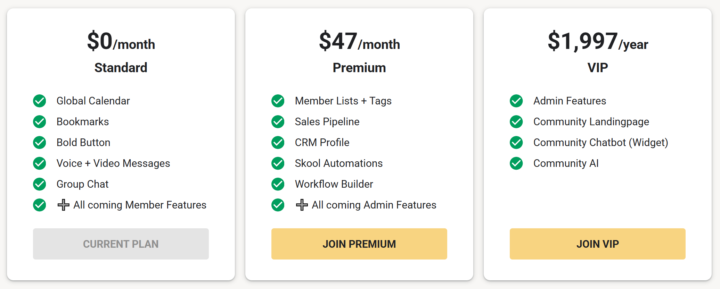
The last two weeks have been insane. What started as a small hobby project has turned into a 𝗺𝗮𝘀𝘀𝗶𝘃𝗲 𝗮𝗽𝗽𝗹𝗶𝗰𝗮𝘁𝗶𝗼𝗻. Day by day, I’ve watched Skool Extensions become more and more powerful. Your feedback has been incredibly helpful in this process. I’m currently in a total flow state, pushing development every single day. My goal is for Skool Extensions to become a must-have for every Skooler. Naturally, I’ve been thinking about the business model. A premium version of the extension is the obvious path, but at the same time, I want to ensure a powerful free version remains available forever. On March 31st, just in time for my birthday, I will be launching Skool Extensions Premium. From that date, all 𝗔𝗱𝗺𝗶𝗻 𝗙𝗲𝗮𝘁𝘂𝗿𝗲𝘀 will be exclusive to the paid version for $𝟰𝟳/𝗺𝗼𝗻𝘁𝗵. There will, however, always be a 14-day free trial for these features. In addition to the recently developed Admin Features like member lists, tagging systems, sales pipelines, and CRM profiles, I’m adding extensive Skool Automations with a flexible Workflow Builder on March 31st. This tool alone is going to be massive and will take your Skool game to the next level. You won’t need any other Chrome Extension for Skool ever again. All 𝗠𝗲𝗺𝗯𝗲𝗿 𝗙𝗲𝗮𝘁𝘂𝗿𝗲𝘀, including the community calendar, group chat, voice and video messages, bold text, bookmarks, etc. will remain 𝗳𝗿𝗲𝗲 𝗳𝗼𝗿𝗲𝘃𝗲𝗿. For you and your members. Billing for Premium will be handled automatically through this Freemium community. I’ve already set the 𝗮𝗳𝗳𝗶𝗹𝗶𝗮𝘁𝗲 commission to 𝟮𝟬%, so inviting people to join this community for free will definitely be worth your while! --- Die letzten zwei Wochen waren der Wahnsinn. Aus einem kleinen Hobbyprojekt ist eine 𝗠𝗼𝗻𝘀𝘁𝗲𝗿𝗮𝗻𝘄𝗲𝗻𝗱𝘂𝗻𝗴 geworden. Von Tag zu Tag konnte ich beobachten, wie die Skool Extensions mächtiger und mächtiger geworden sind. Euer Feedback hat dabei wahnsinnig geholfen. Ich bin gerade in einem absoluten Flow und pushe die Entwicklung jeden Tag. Skool Extensions sollen ein Must-have für jeden Skooler werden.
🔥
2 likes • 14d
Good stuff!
🔥
15d •
Video Messages
𝗩𝗶𝗱𝗲𝗼 𝗠𝗲𝘀𝘀𝗮𝗴𝗲𝘀 — 𝗥𝗲𝗰𝗼𝗿𝗱 𝗮𝗻𝗱 𝗦𝗲𝗻𝗱 𝗩𝗶𝗱𝗲𝗼 𝗶𝗻 𝗗𝗠𝘀 & 𝗖𝗼𝗺𝗺𝗲𝗻𝘁𝘀 Sometimes a quick video says more than a paragraph of text. Video Messages let you record and send short video clips directly in Skool's DMs and post comment editors — no external tools, no file juggling. Wherever you see the microphone button (DMs or comment editors), hover over it to reveal a small camera badge in the top-right corner. Click the badge to switch from audio to video mode. Now click the button to start recording — a live camera preview appears alongside a real-time timer so you always know how long you've been recording. Click again to stop, and the video is automatically attached to your message or comment, ready to send. The recording captures both video and audio using your browser's native MediaRecorder API (WebM format). There's a 10-minute maximum — if you hit the limit, the recording stops and attaches automatically. The video is sent through Skool's native file attachment system, so the recipient can play it right in the chat or comment thread. The camera preview and recording UI adapt to your current theme (dark or light mode). Video Messages can be toggled on or off independently from Voice Messages in the Toolkit Settings — so you can use one, both, or neither. --- 𝗩𝗶𝗱𝗲𝗼𝗻𝗮𝗰𝗵𝗿𝗶𝗰𝗵𝘁𝗲𝗻 — 𝗩𝗶𝗱𝗲𝗼 𝗮𝘂𝗳𝗻𝗲𝗵𝗺𝗲𝗻 𝘂𝗻𝗱 𝗶𝗻 𝗗𝗠𝘀 & 𝗞𝗼𝗺𝗺𝗲𝗻𝘁𝗮𝗿𝗲𝗻 𝘀𝗲𝗻𝗱𝗲𝗻 Manchmal sagt ein kurzes Video mehr als ein ganzer Absatz Text. Videonachrichten lassen dich kurze Videoclips direkt in Skools DMs und Post-Kommentar-Editoren aufnehmen und senden — keine externen Tools, kein Datei-Gefummel. Überall, wo du den Mikrofon-Button siehst (DMs oder Kommentar-Editoren), fahre mit der Maus darüber, um ein kleines Kamera-Badge in der oberen rechten Ecke zu sehen. Klick auf das Badge, um vom Audio- in den Video-Modus zu wechseln. Jetzt klick auf den Button, um die Aufnahme zu starten — eine Live-Kameravorschau erscheint zusammen mit einem Echtzeit-Timer, damit du immer weißt, wie lange du schon aufnimmst. Klick erneut, um zu stoppen, und das Video wird automatisch an deine Nachricht oder deinen Kommentar angehängt, bereit zum Senden.
🔥
5 likes • 15d
Wow, man, this video messages feature is amazing, but I've been wondering: how do we change the camera we use in that recording?
🔥
4 likes • 15d
@Marco Berlin ahh okay thanks
🔥
19d •
Right-Click Quick Actions
𝗥𝗶𝗴𝗵𝘁-𝗖𝗹𝗶𝗰𝗸 𝗤𝘂𝗶𝗰𝗸 𝗔𝗰𝘁𝗶𝗼𝗻𝘀 — 𝗦𝗵𝗼𝗿𝘁𝗰𝘂𝘁𝘀 𝗪𝗵𝗲𝗿𝗲 𝗬𝗼𝘂 𝗡𝗲𝗲𝗱 𝗧𝗵𝗲𝗺 The extension adds context-sensitive right-click menus to key elements on Skool, giving you instant access to actions that would otherwise require multiple clicks or page navigations. Right-click on any event in the Calendar sidebar and you get five options to export it to your personal calendar: Google Calendar, Apple Calendar, Outlook, Outlook.com, or Yahoo. Google opens a pre-filled event in a new tab. The other four download the event as an ICS file directly through Skool's API — no copy-pasting of dates or titles needed. Right-click on the notification bell in the navbar and you'll see "Customize notifications", which opens Skool's notification settings page in a new tab. A shortcut to a page that's otherwise buried several clicks deep. Right-click on any category chip in your community feed (admin/owner only) and you get "Edit Categories", which opens the community settings directly on the categories panel — skipping the three-step navigation through Settings, Community, and Categories. Right-click on any bio section on a profile page and you get "Edit bio", which opens your profile settings and focuses the bio field — a direct shortcut to update your description. Right-click on the pinned groups sidebar (the community icons on the left) and you get "Community settings", which opens the community management page in a new tab. All right-click menus can be globally enabled or disabled via the "Right-Click Menus" toggle in the settings panel. All context menus adapt to your current theme (dark or light mode) and follow the extension's language setting. --- 𝗥𝗲𝗰𝗵𝘁𝘀𝗸𝗹𝗶𝗰𝗸-𝗦𝗰𝗵𝗻𝗲𝗹𝗹𝗮𝗸𝘁𝗶𝗼𝗻𝗲𝗻 — 𝗔𝗯𝗸ü𝗿𝘇𝘂𝗻𝗴𝗲𝗻 𝗴𝗲𝗻𝗮𝘂 𝗱𝗼𝗿𝘁, 𝘄𝗼 𝗱𝘂 𝘀𝗶𝗲 𝗯𝗿𝗮𝘂𝗰𝗵𝘀𝘁 Die Extension fügt kontextsensitive Rechtsklick-Menüs an wichtigen Elementen auf Skool hinzu und gibt dir sofortigen Zugriff auf Aktionen, die sonst mehrere Klicks oder Seitenwechsel erfordern würden. Rechtsklick auf ein Event in der Kalender-Sidebar zeigt dir fünf Optionen zum Export in deinen persönlichen Kalender: Google Kalender, Apple Kalender, Outlook, Outlook.com oder Yahoo. Google öffnet ein vorausgefülltes Event in einem neuen Tab. Die anderen vier laden das Event als ICS-Datei direkt über Skools API herunter — kein Kopieren von Daten oder Titeln nötig.
🔥
5 likes • 19d
Cool, that might be useful.
1-9 of 9

Active 2h ago
Joined Mar 13, 2026
ISTJ
Orihuela, Spain
Powered by