Activity
Mon
Wed
Fri
Sun
May
Jun
Jul
Aug
Sep
Oct
Nov
Dec
Jan
Feb
Mar
Apr
What is this?
Less
More
Owned by Laura
We shine a light on Your Community, Your Freebies, Your Progress, and Your Expertise through Accelerator Events and Structured Participation Systems.
Memberships
6 contributions to Skool Extensions 🧩

🔥
13d •
CRM (Admin Feature 👑)
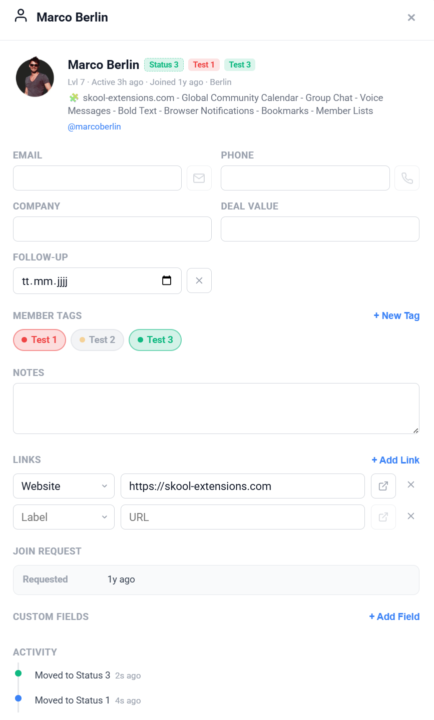
𝗖𝗥𝗠 — 𝗬𝗼𝘂𝗿 𝗣𝗲𝗿𝘀𝗼𝗻𝗮𝗹 𝗖𝗼𝗻𝘁𝗮𝗰𝘁 𝗗𝗮𝘁𝗮𝗯𝗮𝘀𝗲 𝗳𝗼𝗿 𝗖𝗼𝗺𝗺𝘂𝗻𝗶𝘁𝘆 𝗠𝗲𝗺𝗯𝗲𝗿𝘀 Skool shows you who's in your community, but it doesn't give you a place to store the details that matter for your business — phone numbers, company names, deal values, or follow-up dates. CRM adds a full contact management layer right inside Skool. Click any member in the Members Panel or on a Pipeline card to open their CRM card. Each card stores email, phone, company, deal value, follow-up date, and free-text notes. All fields auto-save as you type — no submit button needed. Set a follow-up date and it appears as a badge on the member's Pipeline card. Overdue follow-ups pulse in red so nothing slips through the cracks. The follow-up date field uses a native date picker for quick entry. Need to track data that doesn't fit the standard fields? Add unlimited custom fields with your own labels and values — perfect for tracking contract status, referral source, subscription tier, or anything else. Each custom field can be renamed or deleted individually. Store links for each member — LinkedIn profiles, websites, contracts, or any URL. Links auto-detect from the member's Skool profile and can be opened in a new tab directly from the CRM modal. Add, edit, or remove links at any time. If the member submitted a join request with survey answers, those appear in a dedicated section of the CRM profile — including the date of the request and the location from which they applied. You can also open a member's CRM card via the right-click context menu on any username or avatar across Skool. All CRM data is stored locally in your browser for privacy and synced via Cloud Sync when enabled. The feature can be toggled on or off in the Toolkit Settings under the Admin section. When disabled, CRM buttons and click-to-open behavior are hidden, but your data is preserved. --- 𝗖𝗥𝗠 — 𝗗𝗲𝗶𝗻𝗲 𝗽𝗲𝗿𝘀ö𝗻𝗹𝗶𝗰𝗵𝗲 𝗞𝗼𝗻𝘁𝗮𝗸𝘁𝗱𝗮𝘁𝗲𝗻𝗯𝗮𝗻𝗸 𝗳ü𝗿 𝗖𝗼𝗺𝗺𝘂𝗻𝗶𝘁𝘆-𝗠𝗶𝘁𝗴𝗹𝗶𝗲𝗱𝗲𝗿 Skool zeigt dir, wer in deiner Community ist, aber es gibt keinen Ort, um die Details zu speichern, die für dein Business wichtig sind — Telefonnummern, Firmennamen, Deal-Werte oder Follow-up-Termine. CRM fügt eine vollständige Kontaktverwaltung direkt in Skool hinzu.

🔥
1 like • 13d
@Marco Berlin I feel a bit sad that you are transferring your first 200 founding users to the paid version.
🔥
14d •
Sales Pipeline (Admin Feature 👑)
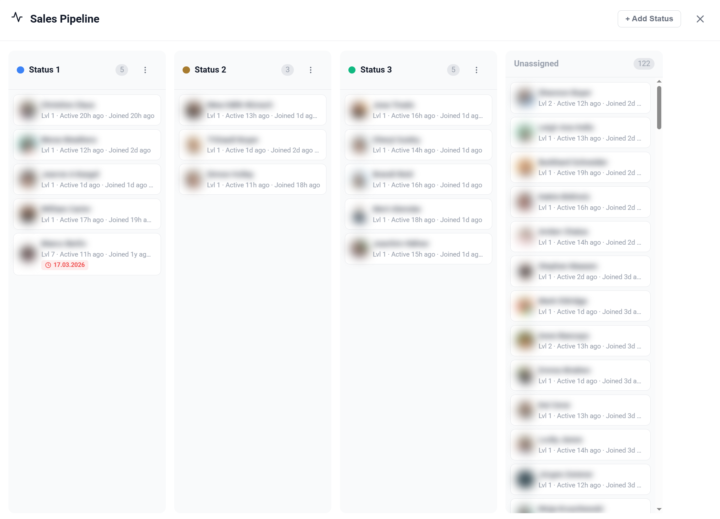
𝗦𝗮𝗹𝗲𝘀 𝗣𝗶𝗽𝗲𝗹𝗶𝗻𝗲 — 𝗧𝗿𝗮𝗰𝗸 𝗠𝗲𝗺𝗯𝗲𝗿𝘀 𝗧𝗵𝗿𝗼𝘂𝗴𝗵 𝗬𝗼𝘂𝗿 𝗙𝘂𝗻𝗻𝗲𝗹 Managing a community means knowing where each member stands in your sales process. The Sales Pipeline gives you a visual, Kanban-style board to track members through customizable stages — right inside Skool. Open the pipeline from the dedicated button in your Members Panel. You'll see a board with columns representing your pipeline stages. Each member card shows the avatar, name, and community. Drag and drop members between columns to update their status, or assign a status directly from the member's right-click context menu in the Members Panel. You have full control over your pipeline stages: create new statuses, rename them, assign custom colors, and drag to reorder. Default stages like "Lead", "Contacted", "Negotiation", and "Closed" are provided to get you started — but you can customize everything to match your actual sales process. Pipeline status badges appear next to member names throughout the platform — in the Members Panel, in comment threads, and on profile cards — so you always have context without opening the pipeline board. The badges use your custom colors for instant visual recognition. The pipeline also works cross-community: members from all your cached communities appear in the board, and you can filter by community to focus on a specific group. All pipeline data syncs via Cloud Sync, so your stages and assignments are available across browsers and devices. The feature can be toggled on or off in the Toolkit Settings under the Admin section. --- 𝗦𝗮𝗹𝗲𝘀 𝗣𝗶𝗽𝗲𝗹𝗶𝗻𝗲 — 𝗠𝗶𝘁𝗴𝗹𝗶𝗲𝗱𝗲𝗿 𝗱𝘂𝗿𝗰𝗵 𝗱𝗲𝗶𝗻𝗲𝗻 𝗙𝘂𝗻𝗻𝗲𝗹 𝘃𝗲𝗿𝗳𝗼𝗹𝗴𝗲𝗻 Eine Community zu managen bedeutet zu wissen, wo jedes Mitglied in deinem Verkaufsprozess steht. Die Sales Pipeline gibt dir ein visuelles Kanban-Board, um Mitglieder durch anpassbare Stufen zu verfolgen — direkt in Skool. Öffne die Pipeline über den dedizierten Button in deinem Members Panel. Du siehst ein Board mit Spalten, die deine Pipeline-Stufen darstellen. Jede Mitgliederkarte zeigt Avatar, Name und Community. Ziehe Mitglieder per Drag & Drop zwischen Spalten, um ihren Status zu aktualisieren, oder weise einen Status direkt über das Rechtsklick-Kontextmenü im Members Panel zu.
🔥
3 likes • 14d
@Julie Siler I toggled it on and off, and my members appeared in unassigned
🔥
4 likes • 14d
@William Carter That's handy :)
🔥
24d •
Copy to Module (Admin Feature 👑)
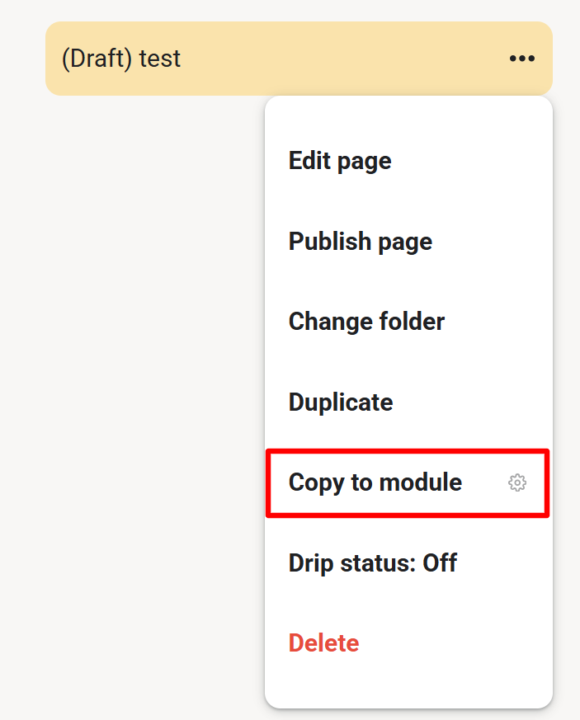
𝗖𝗼𝗽𝘆 𝘁𝗼 𝗠𝗼𝗱𝘂𝗹𝗲 — 𝗗𝘂𝗽𝗹𝗶𝗰𝗮𝘁𝗲 𝗟𝗲𝘀𝘀𝗼𝗻𝘀 𝗔𝗰𝗿𝗼𝘀𝘀 𝗠𝗼𝗱𝘂𝗹𝗲𝘀 As a community admin, sometimes you need the same lesson in multiple modules — for a "Best Of" collection, restructuring your course, or making content available in different contexts. Copy to Module lets you duplicate any lesson (including its video) into another module with just a few clicks. Open any lesson's 3-dot menu and select "Copy to module". A dialog appears where you choose the target module from a dropdown. Click "Copy" and the extension handles the rest — duplicating the page content, preserving the video, and placing it in your chosen module. Once done, you're automatically redirected to the new copy. No more manually recreating lessons or losing video associations when reorganizing your course content. --- 𝗜𝗻 𝗠𝗼𝗱𝘂𝗹 𝗸𝗼𝗽𝗶𝗲𝗿𝗲𝗻 — 𝗟𝗲𝗸𝘁𝗶𝗼𝗻𝗲𝗻 𝘇𝘄𝗶𝘀𝗰𝗵𝗲𝗻 𝗠𝗼𝗱𝘂𝗹𝗲𝗻 𝗱𝘂𝗽𝗹𝗶𝘇𝗶𝗲𝗿𝗲𝗻 Als Community-Admin brauchst du manchmal die gleiche Lektion in mehreren Modulen — für eine "Best Of"-Sammlung, eine Kurs-Umstrukturierung oder um Inhalte in verschiedenen Kontexten verfügbar zu machen. Copy to Module lässt dich jede Lektion (inklusive Video) mit wenigen Klicks in ein anderes Modul duplizieren. Öffne das 3-Punkte-Menü einer beliebigen Lektion und wähle "In Modul kopieren". Ein Dialog erscheint, in dem du das Zielmodul aus einem Dropdown wählst. Klick auf "Kopieren" und die Extension erledigt den Rest — dupliziert den Seiteninhalt, behält das Video bei und platziert alles in deinem gewählten Modul. Anschließend wirst du automatisch zur neuen Kopie weitergeleitet. Kein manuelles Neuerstellen von Lektionen mehr und kein Verlust von Video-Verknüpfungen beim Reorganisieren deiner Kursinhalte.
🔥
3 likes • 19d
@Marco Berlin If it's good it needs to spread :)
🔥
3 likes • 17d
@Marco Berlin Thank. Will do! And I just saw the automatic upgrade to the next version. Perfect !!!!!
🔥
19d •
Text Templates
𝗧𝗲𝘅𝘁 𝗧𝗲𝗺𝗽𝗹𝗮𝘁𝗲𝘀 — 𝗥𝗲𝘂𝘀𝗮𝗯𝗹𝗲 𝗧𝗲𝘅𝘁 𝗦𝗻𝗶𝗽𝗽𝗲𝘁𝘀 𝗳𝗼𝗿 𝗗𝗠𝘀, 𝗣𝗼𝘀𝘁𝘀, 𝗮𝗻𝗱 𝗖𝗼𝗺𝗺𝗲𝗻𝘁𝘀 Typing the same messages over and over wastes time. Text Templates let you save reusable text snippets and insert them with a single click — in direct messages, post editors, and comment fields. Click the templates icon in the toolbar to open the Templates panel. Here you can create, edit, and delete your own templates. Each template has a title and a body. A built-in "Group Chat Invite" template comes pre-installed and can be customized but not deleted — only reset to default. Templates appear in three places across the Skool interface: DM Chat Input — A templates icon appears next to the attachment button in any direct message conversation. Click it to open a dropdown showing all your templates. Select one to instantly insert its text into the chat input. The Group Chat Invite template shows a submenu where you pick which group to invite to — the invite link and group name are filled in automatically. Post & Comment Editors — A templates icon appears in the toolbar of every post editor and comment/reply composer. Click it to see a dropdown of your static templates (excluding the Group Chat Invite). Select a template to insert its text at the cursor position. Templates Panel — The full management panel in the sidebar lets you create new templates, edit existing ones, and delete custom templates. The panel supports pinning (stays open during navigation) and is resizable by dragging its left edge (280–700px). Width is saved per session. Templates support dynamic variables that are resolved at insert time: - `#NAME#` — Replaced with the current chat partner's first name (extracted from the chat input placeholder) - `#GROUPNAME#` — Replaced with the current community's display name - `#GROUPCHAT#` — Replaced with the Group Chat name (only in GC Invite template) - `#JOINLINK#` — Replaced with the encrypted Group Chat invite link (only in GC Invite template) All templates are synced across devices via `chrome.storage.sync`. The feature adapts to dark and light mode and can be toggled on or off in the Toolkit Settings.
🔥
3 likes • 19d
@Marco Berlin Maybe you need to create a button for "new version available", or something like that, because when I de-activated, and activated the extension, I lost my bookmarks.
🔥
3 likes • 19d
@Marco Berlin Yeah, maybe let them login with google account
🔥
19d •
Right-Click Quick Actions
𝗥𝗶𝗴𝗵𝘁-𝗖𝗹𝗶𝗰𝗸 𝗤𝘂𝗶𝗰𝗸 𝗔𝗰𝘁𝗶𝗼𝗻𝘀 — 𝗦𝗵𝗼𝗿𝘁𝗰𝘂𝘁𝘀 𝗪𝗵𝗲𝗿𝗲 𝗬𝗼𝘂 𝗡𝗲𝗲𝗱 𝗧𝗵𝗲𝗺 The extension adds context-sensitive right-click menus to key elements on Skool, giving you instant access to actions that would otherwise require multiple clicks or page navigations. Right-click on any event in the Calendar sidebar and you get five options to export it to your personal calendar: Google Calendar, Apple Calendar, Outlook, Outlook.com, or Yahoo. Google opens a pre-filled event in a new tab. The other four download the event as an ICS file directly through Skool's API — no copy-pasting of dates or titles needed. Right-click on the notification bell in the navbar and you'll see "Customize notifications", which opens Skool's notification settings page in a new tab. A shortcut to a page that's otherwise buried several clicks deep. Right-click on any category chip in your community feed (admin/owner only) and you get "Edit Categories", which opens the community settings directly on the categories panel — skipping the three-step navigation through Settings, Community, and Categories. Right-click on any bio section on a profile page and you get "Edit bio", which opens your profile settings and focuses the bio field — a direct shortcut to update your description. Right-click on the pinned groups sidebar (the community icons on the left) and you get "Community settings", which opens the community management page in a new tab. All right-click menus can be globally enabled or disabled via the "Right-Click Menus" toggle in the settings panel. All context menus adapt to your current theme (dark or light mode) and follow the extension's language setting. --- 𝗥𝗲𝗰𝗵𝘁𝘀𝗸𝗹𝗶𝗰𝗸-𝗦𝗰𝗵𝗻𝗲𝗹𝗹𝗮𝗸𝘁𝗶𝗼𝗻𝗲𝗻 — 𝗔𝗯𝗸ü𝗿𝘇𝘂𝗻𝗴𝗲𝗻 𝗴𝗲𝗻𝗮𝘂 𝗱𝗼𝗿𝘁, 𝘄𝗼 𝗱𝘂 𝘀𝗶𝗲 𝗯𝗿𝗮𝘂𝗰𝗵𝘀𝘁 Die Extension fügt kontextsensitive Rechtsklick-Menüs an wichtigen Elementen auf Skool hinzu und gibt dir sofortigen Zugriff auf Aktionen, die sonst mehrere Klicks oder Seitenwechsel erfordern würden. Rechtsklick auf ein Event in der Kalender-Sidebar zeigt dir fünf Optionen zum Export in deinen persönlichen Kalender: Google Kalender, Apple Kalender, Outlook, Outlook.com oder Yahoo. Google öffnet ein vorausgefülltes Event in einem neuen Tab. Die anderen vier laden das Event als ICS-Datei direkt über Skools API herunter — kein Kopieren von Daten oder Titeln nötig.
🔥
5 likes • 19d
Love this!!!
1-6 of 6

🔥
@laurapaulina
I help Skool owners get seen, grow their email list, and attract new members by using Accelerator Events and structured participation systems.
Online now
Joined Mar 18, 2026
Cubaweg, curacao
Powered by