Activity
Mon
Wed
Fri
Sun
May
Jun
Jul
Aug
Sep
Oct
Nov
Dec
Jan
Feb
Mar
Apr
What is this?
Less
More
Owned by Melli
💛Treffe Menschen mit Visionen, tausche dich aus und entwickle neue Perspektiven. Connect & Grow – wo Verbindung zu Wachstum wird. ✨
Visibility ist die Community für alle, die mehr Reichweite und Wirkung auf LinkedIn, Facebook, Instagram & Co. wollen
Memberships
Human Design Deep Dive Mastery
142 members • Free
Skool Extensions 🧩
290 members • Free
Alvorian foundation
57 members • Free
Community MasterClass
255 members • $99/m
Powerhouse - Präsenz die wirkt
72 members • Free
Activity 🩵 byGeraldGerlich
55 members • $99/month
WW
Warum wir Menschen so handeln
43 members • Free
Neurohacking Community
901 members • Free
Heilraum Natur - Natürlich Du
72 members • Free
2 contributions to Skool Extensions 🧩

🔥
10d •
Frage
Wie bekomme ich das kleine Dashboard von Skool Extensions so gesetzt, dass es nicht die Zeile Mark as read und die Auswahl Just this community überdeckt?
🔥
2 likes • 10d
@Marco Berlin hinter dem Streifen der Extensions liegt dieses Mark as read und wo man anwählen kann. Ich arbeite mit einem Vivo-book von Samsung. Danke!
🔥
1 like • 7d
Danke @Marco Berlin ich habe jetzt das Kreuz entdeckt, mit dem ich verkleinern kann. Wunderbar. Danke!

🔥
7d •
Course Overview (Admin Feature 👑)
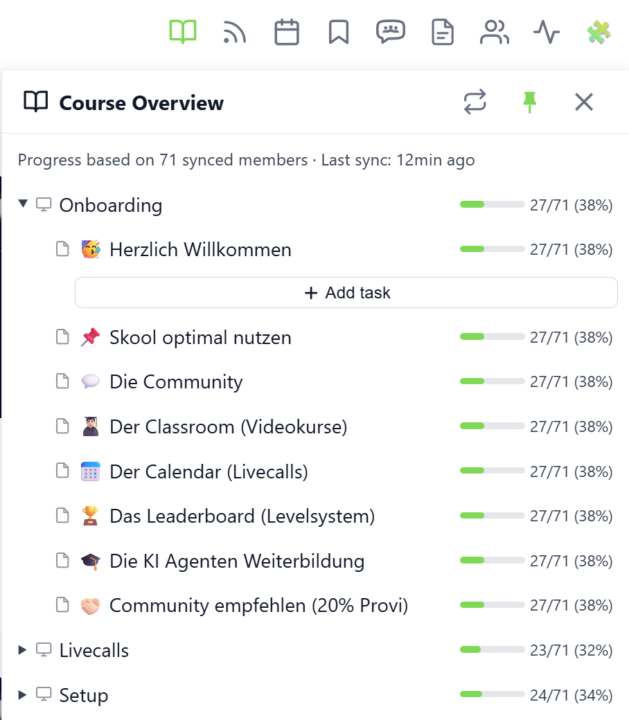
𝗖𝗼𝘂𝗿𝘀𝗲 𝗢𝘃𝗲𝗿𝘃𝗶𝗲𝘄 — 𝗬𝗼𝘂𝗿 𝗘𝗻𝘁𝗶𝗿𝗲 𝗖𝗹𝗮𝘀𝘀𝗿𝗼𝗼𝗺 𝗦𝘁𝗿𝘂𝗰𝘁𝘂𝗿𝗲 𝗮𝘁 𝗮 𝗚𝗹𝗮𝗻𝗰𝗲 Managing a Skool classroom with multiple modules, folders, and pages means a lot of clicking and scrolling to understand the full picture. Course Overview adds a dedicated sidebar panel that shows your complete course structure as an expandable tree — every module, every folder, every page — without leaving the page you're on. Click the book icon in your toolbar to open the panel. Each module shows as a collapsible row with a folder icon for subfolders and page icons for individual lessons. Click any module to expand it and reveal its nested content, loaded directly from Skool's data. The tree remembers which modules you've expanded, so your view stays consistent as you navigate. The real power comes from the completion stats. If you've synced your members' course progress, each module displays a green progress bar showing what percentage of your members have started it. Hover over the bar to see member names, or click it to open a popup with the full list — complete with avatars, tags, and pipeline status. A note at the bottom shows how many synced members the percentages are based on. Hit the refresh button to reload the course structure or update completion stats. The panel respects the 24-hour sync cooldown and shows when the next sync is available. You can pin the panel to keep it open while you browse, resize it by dragging the left edge, or close it when you're done. Course Overview is available for admins and owners only, and works on any page within your community. The feature can be toggled in the Toolkit Settings under the Admin section. --- 𝗞𝘂𝗿𝘀ü𝗯𝗲𝗿𝘀𝗶𝗰𝗵𝘁 — 𝗗𝗲𝗶𝗻𝗲 𝗴𝗲𝘀𝗮𝗺𝘁𝗲 𝗖𝗹𝗮𝘀𝘀𝗿𝗼𝗼𝗺-𝗦𝘁𝗿𝘂𝗸𝘁𝘂𝗿 𝗮𝘂𝗳 𝗲𝗶𝗻𝗲𝗻 𝗕𝗹𝗶𝗰𝗸 Eine Skool-Classroom mit mehreren Modulen, Ordnern und Seiten zu verwalten bedeutet viel Klicken und Scrollen, um das Gesamtbild zu verstehen. Die Kursübersicht fügt ein eigenes Sidebar-Panel hinzu, das deine komplette Kursstruktur als aufklappbaren Baum zeigt — jedes Modul, jeden Ordner, jede Seite — ohne die aktuelle Seite zu verlassen.
🔥
2 likes • 7d
Klasse!
1-2 of 2

🔥
@melli-heinz
Ikigai - Sinn finden - Fülle leben; Stressmanagement; ZRM; Potential entfalten
Online now
Joined Mar 26, 2026
Siegen
Powered by