Activity
Mon
Wed
Fri
Sun
May
Jun
Jul
Aug
Sep
Oct
Nov
Dec
Jan
Feb
Mar
Apr
What is this?
Less
More
Owned by Michael
Gemeinsam Kanäle aufbauen: Technik, Strategie, Motivation! Für Neueinsteiger & Erfahrene - werde Value Creator – hier unterstützen wir uns dabei 💪🎥
Memberships
🦞OpenClaw Community🦞
11 members • $9/month
Openclaw Builders Club
157 members • Free
OpenClaw Users
713 members • Free
Voicery Community
27 members • $29/month
Vibe Coding School
614 members • Free
n8n KI Agenten
9.9k members • Free
n8n KI Business Agenten
237 members • $97/month
The RoboNuggets Network (free)
40.2k members • Free
Level 9
6 members • Free
3 contributions to Skool Extensions 🧩

🔥
19d •
Right-Click Quick Actions
𝗥𝗶𝗴𝗵𝘁-𝗖𝗹𝗶𝗰𝗸 𝗤𝘂𝗶𝗰𝗸 𝗔𝗰𝘁𝗶𝗼𝗻𝘀 — 𝗦𝗵𝗼𝗿𝘁𝗰𝘂𝘁𝘀 𝗪𝗵𝗲𝗿𝗲 𝗬𝗼𝘂 𝗡𝗲𝗲𝗱 𝗧𝗵𝗲𝗺 The extension adds context-sensitive right-click menus to key elements on Skool, giving you instant access to actions that would otherwise require multiple clicks or page navigations. Right-click on any event in the Calendar sidebar and you get five options to export it to your personal calendar: Google Calendar, Apple Calendar, Outlook, Outlook.com, or Yahoo. Google opens a pre-filled event in a new tab. The other four download the event as an ICS file directly through Skool's API — no copy-pasting of dates or titles needed. Right-click on the notification bell in the navbar and you'll see "Customize notifications", which opens Skool's notification settings page in a new tab. A shortcut to a page that's otherwise buried several clicks deep. Right-click on any category chip in your community feed (admin/owner only) and you get "Edit Categories", which opens the community settings directly on the categories panel — skipping the three-step navigation through Settings, Community, and Categories. Right-click on any bio section on a profile page and you get "Edit bio", which opens your profile settings and focuses the bio field — a direct shortcut to update your description. Right-click on the pinned groups sidebar (the community icons on the left) and you get "Community settings", which opens the community management page in a new tab. All right-click menus can be globally enabled or disabled via the "Right-Click Menus" toggle in the settings panel. All context menus adapt to your current theme (dark or light mode) and follow the extension's language setting. --- 𝗥𝗲𝗰𝗵𝘁𝘀𝗸𝗹𝗶𝗰𝗸-𝗦𝗰𝗵𝗻𝗲𝗹𝗹𝗮𝗸𝘁𝗶𝗼𝗻𝗲𝗻 — 𝗔𝗯𝗸ü𝗿𝘇𝘂𝗻𝗴𝗲𝗻 𝗴𝗲𝗻𝗮𝘂 𝗱𝗼𝗿𝘁, 𝘄𝗼 𝗱𝘂 𝘀𝗶𝗲 𝗯𝗿𝗮𝘂𝗰𝗵𝘀𝘁 Die Extension fügt kontextsensitive Rechtsklick-Menüs an wichtigen Elementen auf Skool hinzu und gibt dir sofortigen Zugriff auf Aktionen, die sonst mehrere Klicks oder Seitenwechsel erfordern würden. Rechtsklick auf ein Event in der Kalender-Sidebar zeigt dir fünf Optionen zum Export in deinen persönlichen Kalender: Google Kalender, Apple Kalender, Outlook, Outlook.com oder Yahoo. Google öffnet ein vorausgefülltes Event in einem neuen Tab. Die anderen vier laden das Event als ICS-Datei direkt über Skools API herunter — kein Kopieren von Daten oder Titeln nötig.

1 like • 19d
fantastic news! Absolutely love it! This tool will crush the skool ecosystem.🤓🤓
🔥
27d •
🧩 Skool Extensions starting
skool-extensions.com I’m officially releasing my Skool Extensions! 🥳 Install the extension, give me your feedback and ideas, and spread the word! --- Hiermit veröffentliche ich offiziell meine Skool Chrome Extension 🥳 Installier dir die Extension, geb mir Feedback und Ideen und erzählt es weiter.

8 likes • 23d
Alles in einem Tool - sehr (s)kool 🤓
🔥
24d •
AI Chatbot Widget (VIP)
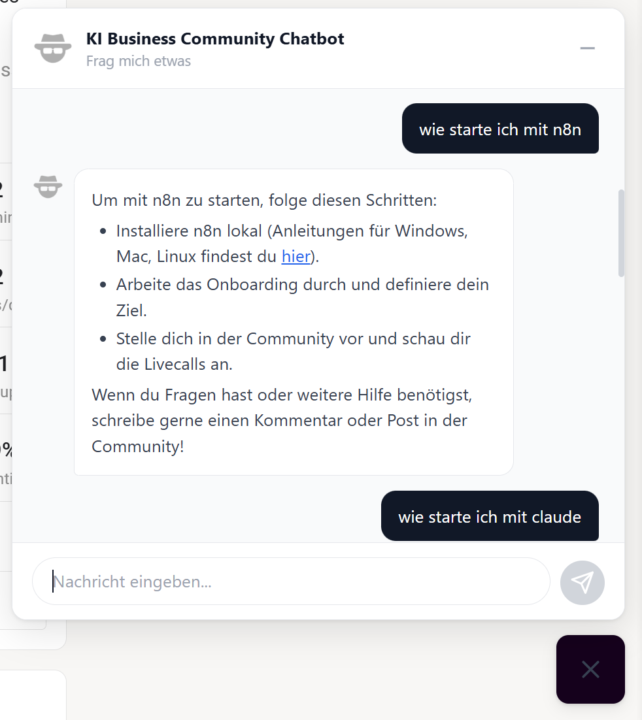
𝗔𝗜 𝗖𝗵𝗮𝘁𝗯𝗼𝘁 — 𝗬𝗼𝘂𝗿 𝗖𝗼𝗺𝗺𝘂𝗻𝗶𝘁𝘆 𝗔𝘀𝘀𝗶𝘀𝘁𝗮𝗻𝘁 The AI Chatbot is a context-aware assistant built right into your Skool community. It sits as a small button in the bottom-right corner of the page — click it to open a chat window where you can ask questions about the community, its content, and more. The chatbot understands the context of the community you're in and provides relevant answers. Your conversation history is automatically saved for 30 days, so you can pick up where you left off. The chat supports formatted text including bold, italic, code snippets, and clickable links. Type your question, hit Enter, and get an answer. Use Shift+Enter for line breaks in longer messages. The chatbot adapts to your current theme (dark or light mode) and only appears in communities where it's been enabled. --- 𝗔𝗜 𝗖𝗵𝗮𝘁𝗯𝗼𝘁 — 𝗗𝗲𝗶𝗻 𝗖𝗼𝗺𝗺𝘂𝗻𝗶𝘁𝘆-𝗔𝘀𝘀𝗶𝘀𝘁𝗲𝗻𝘁 Der AI Chatbot ist ein kontextbezogener Assistent, der direkt in deine Skool-Community integriert ist. Er sitzt als kleiner Button in der unteren rechten Ecke der Seite — klick darauf, um ein Chat-Fenster zu öffnen, in dem du Fragen zur Community, deren Inhalten und mehr stellen kannst. Der Chatbot versteht den Kontext der Community, in der du dich befindest, und liefert relevante Antworten. Dein Gesprächsverlauf wird automatisch 30 Tage lang gespeichert, sodass du dort weitermachen kannst, wo du aufgehört hast. Der Chat unterstützt formatierten Text inklusive Fettschrift, Kursivschrift, Code-Snippets und klickbare Links. Tippe deine Frage ein, drücke Enter und erhalte eine Antwort. Nutze Shift+Enter für Zeilenumbrüche in längeren Nachrichten. Der Chatbot passt sich an dein aktuelles Theme (Dark oder Light Mode) an und erscheint nur in Communities, in denen er aktiviert wurde.
2 likes • 23d
Dazu wäre bestimmt eine kleine Demo mal ganz interessant - nen Loom oder so reicht da schon 🤓
1-3 of 3

@michael-gruendling
💡 skool Community Consultant
💪🏼 Content Strategist
🌱 Empower People
🕊️ Freedom Lover | Author von "Das skool Buch" & "Jeder kann YouTube"
Active 1h ago
Joined Mar 12, 2026
ENFP
Leipzig
Powered by