Activity
Mon
Wed
Fri
Sun
May
Jun
Jul
Aug
Sep
Oct
Nov
Dec
Jan
Feb
Mar
Apr
What is this?
Less
More
Memberships
2DAnimation101
687 members • $9/month
91 contributions to 2DAnimation101
4d •
New Marble much improved, not perfect
I got a Discord notice this morning that Marble had just dropped a new version, so to satisfy my curiosity I tried it from a great pano that previously produced a horrid world. I was very impressed. I get the feeling that they are now using a much finer mesh, though that's just my guess. I say that because complex objects with a lot of shape detail have gone from completely unusable to respectable (if not perfect). Since we now know that OpenArt's world creation uses Marble's engine, I have to wonder if they are using the new version. I still have some Marble credits to use before I switch to OpenArt for world creation.

0 likes • 4d
Good news, that’s definitely a step in the right direction! I’m really looking forward to your new tests. Thanks, Timothy.
0 likes • 10h
Yeah, wait and see...
2d •
To keep testing Utopai
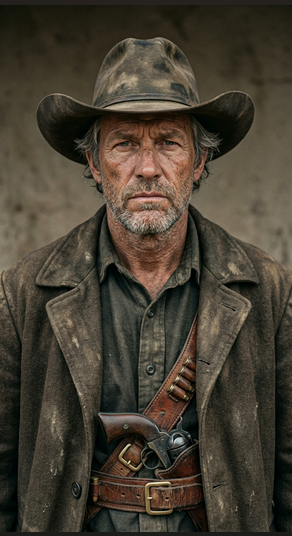
To keep testing Utopai Studios, I gave it a little Western: a lone cowboy shoots one of the men attacking a young Native woman. When he’s about to be lynched, a huge fight breaks out, he’s saved, and he rides off alone, thinking about her. Utopai gave me a detailed 14‑point script, then generated front views of the four main characters (the hero, the young woman, the villain, and the sheriff), which I approved. After that, it created as many keyframes as needed. I only had to tweak two of them so the hero wasn’t still wearing his hat with a rope around his neck, or still carrying his Colt on his belt up on the gallows.
0 likes • 2d
All of that first part was free. Since I’d already used over 1,300 of my 2,000 credits to generate “Red Button,” I now have to wait until May 20 for my balance to reset to 2,000. So I decided to use Galaxy.ai to create the clip after grabbing screenshots of the characters. I ran it through Kling V3 Pro and then did the editing in Premiere Pro.
0 likes • 1d
@Timothy Masters thank you

5d •
I have a Directors Camera Command listing along with a script.
I just wondering if I have included too much into it & it could create more issues than it's worth? Please provide your thoughts on how I have structured it. I plan on trying in the PIA software that Mark is providing 2000 credits in which we can go for a spin in that app!
0 likes • 4d
I’m afraid your script is a bit too detailed. Utopai will lead the way, and you’ll build your storyboard together with it. Here’s what I provided for “Red Button.”
5d •
More whining about Dzine lip sync
I got in the habit of using Dzine for all my lip sync, because it was (and I think still is; not sure) the only one that could handle several people in the frame at the same time. It also does an excellent job with the lips, perfect sync nearly always. But I have complained here that it does crazy things to the rest of the frame. It has put a beard on my clean-shaven guy. It has twisted a straight road into a pretzel. I had it yesterday. I had a clip of a woman speaking to a cat and the cat opening its mouth at the end for a loud meow. Dzine did an excellent job, as usual, with the woman's lips. But despite MANY retries (burning lots of credits) I could not get it to leave the cat alone. It refused to let the cat open its mouth as was in the original video. For some reason it always closed its mouth. And most of the time it gave the cat huge pointed ears making it look like some demonic beast. Why why, why does Dzine lip sync insist on making major changes to the background and other characters? Anyhow I switched to Galaxy lip sync and it did a good job with the woman and it nicely left the rest of the frame alone. So now my new process is to use Dzine only when I have to.
0 likes • 5d
Here’s a really useful test, thank you, Timothy.

6d •
Magic Layers
I came across this new feature in Canva. If you have an image that you want to move things around you can click on magic layers and it breaks the image into parts that are moveable, text can be changed etc. I tried it and it seems the more busy the image the less it works. So the fewer elements in the image then it works great (at least the ones I tried). So if you have an image that is almost perfect but you just need to move something over etc this might be the simple answer instead of running more prompts. I have Canva pro so not sure if it is available on the free version. I thought this might be helpful to someone.

0 likes • 6d
The “Magic Layers” option is only available in Canva Pro — which is pretty lousy, if you ask me.
1-10 of 91
Active 25m ago
Joined Dec 1, 2025
Powered by