Activity
Mon
Wed
Fri
Sun
May
Jun
Jul
Aug
Sep
Oct
Nov
Dec
Jan
Feb
Mar
Apr
What is this?
Less
More
Owned by Vanessa
Use AI to build sellable digital assets for your business or clients - no hype, just real income. 👑 ➡️ Select PREMIUM & save 50% ($222/year)
Memberships
𝙂𝙊𝙊𝙎𝙄𝙁𝙔 🍓🐛🦋🌈⭐️🩷
12.2k members • Free
LinkedIn Strategy Lab
256 members • Free
Skool Extensions 🧩
290 members • Free
✨Authentically You 🎬
471 members • Free
AI Automation Society
318.7k members • Free
Leadership Skool
1.3k members • Free
AI Solopreneur Club
187 members • Free
Chatbots for Course Creators
349 members • Free
Evelyn VIP Courses Vault
378 members • Free
3 contributions to Skool Extensions 🧩

🔥
7d •
Course Overview (Admin Feature 👑)
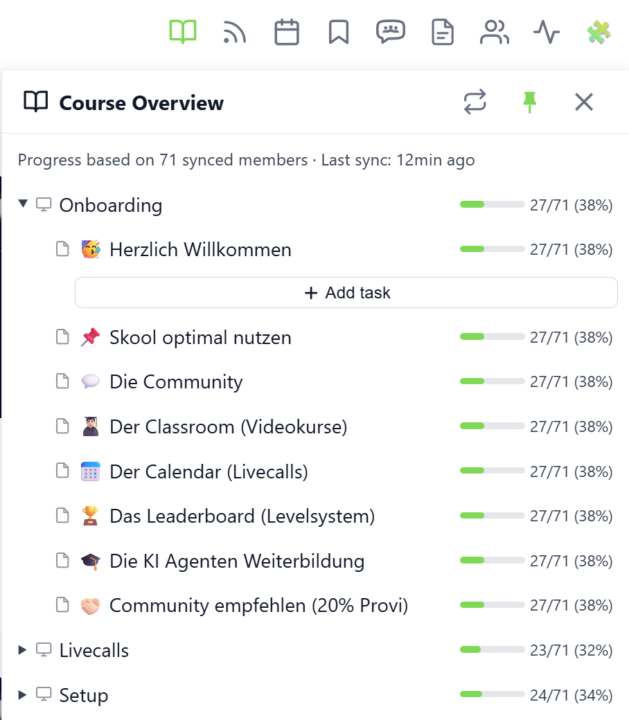
𝗖𝗼𝘂𝗿𝘀𝗲 𝗢𝘃𝗲𝗿𝘃𝗶𝗲𝘄 — 𝗬𝗼𝘂𝗿 𝗘𝗻𝘁𝗶𝗿𝗲 𝗖𝗹𝗮𝘀𝘀𝗿𝗼𝗼𝗺 𝗦𝘁𝗿𝘂𝗰𝘁𝘂𝗿𝗲 𝗮𝘁 𝗮 𝗚𝗹𝗮𝗻𝗰𝗲 Managing a Skool classroom with multiple modules, folders, and pages means a lot of clicking and scrolling to understand the full picture. Course Overview adds a dedicated sidebar panel that shows your complete course structure as an expandable tree — every module, every folder, every page — without leaving the page you're on. Click the book icon in your toolbar to open the panel. Each module shows as a collapsible row with a folder icon for subfolders and page icons for individual lessons. Click any module to expand it and reveal its nested content, loaded directly from Skool's data. The tree remembers which modules you've expanded, so your view stays consistent as you navigate. The real power comes from the completion stats. If you've synced your members' course progress, each module displays a green progress bar showing what percentage of your members have started it. Hover over the bar to see member names, or click it to open a popup with the full list — complete with avatars, tags, and pipeline status. A note at the bottom shows how many synced members the percentages are based on. Hit the refresh button to reload the course structure or update completion stats. The panel respects the 24-hour sync cooldown and shows when the next sync is available. You can pin the panel to keep it open while you browse, resize it by dragging the left edge, or close it when you're done. Course Overview is available for admins and owners only, and works on any page within your community. The feature can be toggled in the Toolkit Settings under the Admin section. --- 𝗞𝘂𝗿𝘀ü𝗯𝗲𝗿𝘀𝗶𝗰𝗵𝘁 — 𝗗𝗲𝗶𝗻𝗲 𝗴𝗲𝘀𝗮𝗺𝘁𝗲 𝗖𝗹𝗮𝘀𝘀𝗿𝗼𝗼𝗺-𝗦𝘁𝗿𝘂𝗸𝘁𝘂𝗿 𝗮𝘂𝗳 𝗲𝗶𝗻𝗲𝗻 𝗕𝗹𝗶𝗰𝗸 Eine Skool-Classroom mit mehreren Modulen, Ordnern und Seiten zu verwalten bedeutet viel Klicken und Scrollen, um das Gesamtbild zu verstehen. Die Kursübersicht fügt ein eigenes Sidebar-Panel hinzu, das deine komplette Kursstruktur als aufklappbaren Baum zeigt — jedes Modul, jeden Ordner, jede Seite — ohne die aktuelle Seite zu verlassen.

🔥
1 like • 6d
@Kimberly Armatys Mainly Lovable with a few on Claude.
🔥
1 like • 5d
@Kimberly Armatys Excellent, I think you are going to love it.
🔥
7d •
Classroom Checklists (Admin Feature 👑)
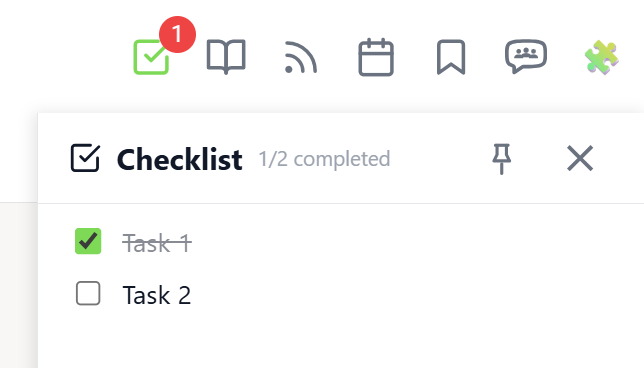
𝗖𝗹𝗮𝘀𝘀𝗿𝗼𝗼𝗺 𝗖𝗵𝗲𝗰𝗸𝗹𝗶𝘀𝘁𝘀 — 𝗔𝗱𝗺𝗶𝗻-𝗖𝗿𝗲𝗮𝘁𝗲𝗱 𝗧𝗮𝘀𝗸 𝗟𝗶𝘀𝘁𝘀 𝗳𝗼𝗿 𝗖𝗹𝗮𝘀𝘀𝗿𝗼𝗼𝗺 𝗣𝗮𝗴𝗲𝘀 Keep your members on track with structured task lists on individual classroom pages. Classroom Checklists let admins create, edit, reorder, and delete tasks that appear directly in the Course Overview panel — giving members a clear view of what needs to be done for each lesson. Open the Course Overview panel and expand a module. Pages that have tasks show a small checklist icon next to their title. Click a page row to reveal its checklist. Each task displays a completion progress bar showing how many members have completed it (e.g. "12/25 (48%)"). Hover over the bar to see the names of members who completed the task. Admins can add new tasks using the input field below the task list. Existing tasks can be edited inline by clicking the pencil icon, reordered by drag & drop, or deleted with the trash icon. Edit and delete buttons appear on hover to keep the interface clean. The feature requires the "Online Features" consent (shared with Group Chat) because checklist data is stored on the server. Task progress is tracked per member and synced across devices. The checklist integrates with the existing Course Overview panel — no separate panel needed. Classroom Checklists can be toggled in the Toolkit Settings under Features. The feature is available on any classroom page within your community. --- 𝗖𝗹𝗮𝘀𝘀𝗿𝗼𝗼𝗺 𝗖𝗵𝗲𝗰𝗸𝗹𝗶𝘀𝘁𝗲𝗻 — 𝗔𝘂𝗳𝗴𝗮𝗯𝗲𝗻𝗹𝗶𝘀𝘁𝗲𝗻 𝗳ü𝗿 𝗖𝗹𝗮𝘀𝘀𝗿𝗼𝗼𝗺-𝗦𝗲𝗶𝘁𝗲𝗻 𝘃𝗼𝗻 𝗔𝗱𝗺𝗶𝗻𝘀 𝗲𝗿𝘀𝘁𝗲𝗹𝗹𝘁 Halte deine Mitglieder auf Kurs mit strukturierten Aufgabenlisten auf einzelnen Classroom-Seiten. Classroom Checklisten ermöglichen es Admins, Aufgaben zu erstellen, zu bearbeiten, neu zu sortieren und zu löschen, die direkt im Kursübersicht-Panel angezeigt werden — so sehen Mitglieder auf einen Blick, was für jede Lektion zu tun ist. Öffne das Kursübersicht-Panel und klappe ein Modul auf. Seiten mit Aufgaben zeigen ein kleines Checklisten-Icon neben dem Titel. Klicke auf eine Seitenzeile, um die Checkliste aufzuklappen. Jede Aufgabe zeigt einen Fortschrittsbalken mit der Anzahl der Mitglieder, die sie abgeschlossen haben (z.B. „12/25 (48%)"). Hover über den Balken, um die Namen der Mitglieder zu sehen, die die Aufgabe erledigt haben.
🔥
2 likes • 5d
Is the admin view a premium feature? I can't see it on my extension.
🔥
2 likes • 5d
@Marco Berlin Thank you
🔥
10d •
Community Stream - Game Changer 🚀
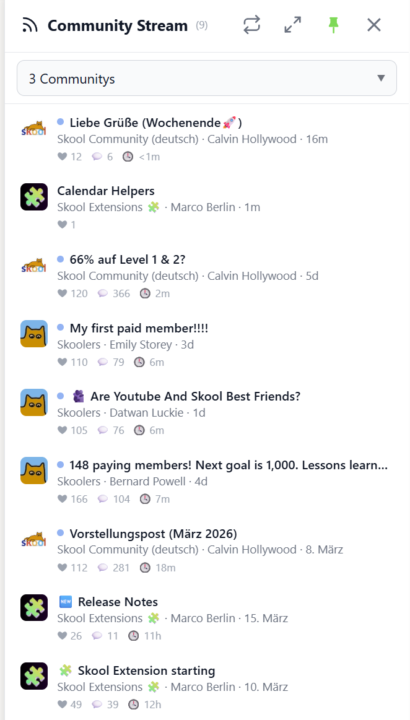
𝗖𝗼𝗺𝗺𝘂𝗻𝗶𝘁𝘆 𝗦𝘁𝗿𝗲𝗮𝗺 — 𝗔 𝗟𝗶𝘃𝗲 𝗙𝗲𝗲𝗱 𝗔𝗰𝗿𝗼𝘀𝘀 𝗔𝗹𝗹 𝗬𝗼𝘂𝗿 𝗖𝗼𝗺𝗺𝘂𝗻𝗶𝘁𝗶𝗲𝘀 Keeping up with multiple Skool communities means jumping between groups and scrolling through separate feeds. Community Stream brings it all together in one sidebar — a live feed of recent posts from your selected communities, right inside Skool. Click the stream icon in your toolbar to open the sidebar. Choose which communities to follow using the selector at the top — pick individual groups or select all at once. The stream shows the three most recent posts from each community, sorted by newest first. Every post displays the community icon, title, author, and a relative timestamp so you can see at a glance what's new and where. Unread posts are marked with a blue dot. Click any post to jump directly to it on Skool, and the dot disappears. The stream auto-refreshes every three minutes, but you can hit the sync button anytime for an instant update. A progress bar shows the refresh status as data loads from each community. Pin the sidebar to keep it open while you browse, or let it close automatically when you click elsewhere. For a bigger view, expand the stream into a full-screen popup. Your community selection and read status are saved across sessions, and cached posts load instantly when you reopen the sidebar. Community Stream can be toggled on or off in the Tools section of the Toolkit Settings. --- 𝗖𝗼𝗺𝗺𝘂𝗻𝗶𝘁𝘆 𝗦𝘁𝗿𝗲𝗮𝗺 — 𝗘𝗶𝗻 𝗟𝗶𝘃𝗲-𝗙𝗲𝗲𝗱 ü𝗯𝗲𝗿 𝗮𝗹𝗹𝗲 𝗱𝗲𝗶𝗻𝗲 𝗖𝗼𝗺𝗺𝘂𝗻𝗶𝘁𝗶𝗲𝘀 Mit mehreren Skool-Communities Schritt zu halten bedeutet, ständig zwischen Gruppen zu wechseln und separate Feeds durchzuscrollen. Der Community Stream bringt alles in einer Sidebar zusammen — ein Live-Feed der neuesten Posts aus deinen ausgewählten Communities, direkt in Skool. Klicke auf das Stream-Icon in deiner Toolbar, um die Sidebar zu öffnen. Wähle über den Selektor oben aus, welchen Communities du folgen möchtest — einzelne Gruppen auswählen oder alle auf einmal. Der Stream zeigt die drei neuesten Posts jeder Community, sortiert nach Aktualität. Jeder Post zeigt das Community-Icon, den Titel, den Autor und einen relativen Zeitstempel — so siehst du auf einen Blick, was neu ist und wo.
🔥
4 likes • 10d
This is amazing!
1-3 of 3

🔥
@vanessa-choi
I help coaches to build sellable digital assets for your business or clients using AI—simple workflows, no tech stress, no hype, just real income. 👑
Active 5h ago
Joined Mar 26, 2026
ENFJ
Powered by